Wooting 80HE Review — The 60HE Grown Up, With an 80% Layout Nobody Else Uses
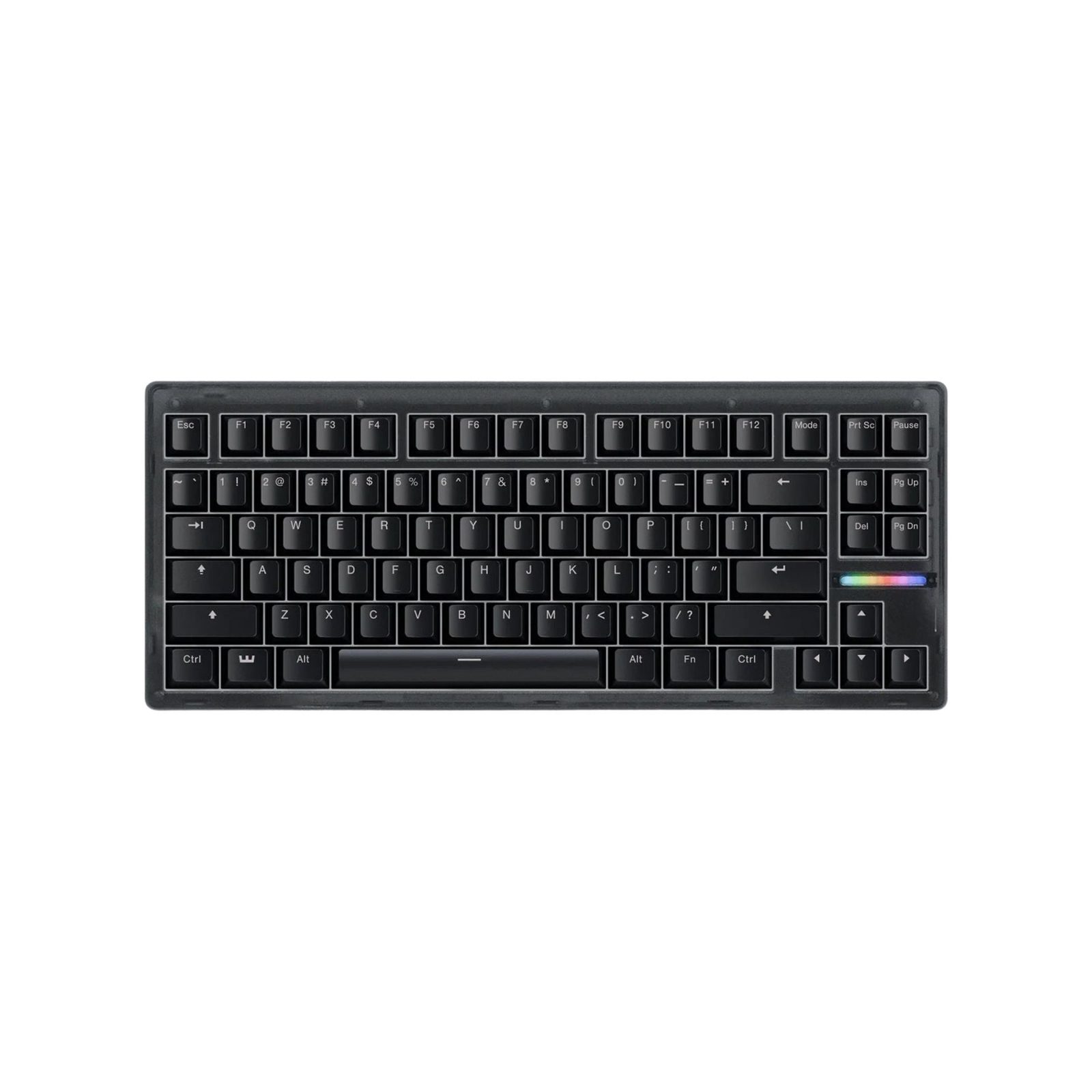
TL;DR
Reviewers landed on the same answer: the 80HE is the best Wooting yet — Lekker V2 switches, 8 kHz polling, gasket mount — and the most polarizing layout in the gaming-keyboard space right now. The plastic chassis flexes, the zinc-cased editions have coating issues, and the 80% PCB doesn't fit any standard third-party case. None of that is stopping it.
Verdict: Buy
Pros
- +Lekker V2 switches — XDA, PC Gamer, and Tom's Guide all rate them as the best magnetic switches available
- +8 kHz polling at the keyboard level (not just USB) — true scan-and-poll, not marketing
- +Gasket-mounted PCB with screw-in stabilizers — the only Wooting that approaches enthusiast feel out of the box
- +Wootility runs in a browser — no driver install required, configs save to onboard memory
- +84-key layout adds dedicated arrows and an F-row — solves the 60HE's biggest typing complaint
Cons
- −Plastic chassis 'has some flex' (PC Gamer) — odd at $200 vs. aluminum competitors
- −Black Zinc edition: r/MechanicalKeyboards reports the zinc coating chipping after 1–2 months
- −84-key layout is non-standard — virtually no third-party cases or keycap kits fit it
- −Wired-only, again. No wireless on any Wooting board
- −$200 base; competing 75% boards (Keychron Q3 Max, GMMK Pro) build to a higher standard for similar money
Ethan Park
Published May 3, 2026
The Wooting 80HE is what happens when you take the 60HE — already the de-facto pro Hall-effect keyboard — and let the same team have another two years to fix everything. The result, by every reviewer's account, is the best gaming keyboard Wooting has shipped. Tom's Guide called it "best in class" software with "beautiful type-feel." XDA gave it 9/10. PC Gamer's verdict: "hilariously powerful."
It's also got the most contested layout in the gaming-keyboard space and a chassis that flexes more than its $200 price suggests. None of that is stopping it from being the obvious pick for anyone who wanted a 60HE but couldn't live without arrow keys.
What you're actually getting
Lekker V2 switches — the headline upgrade. PC Gamer: "A lot of the 80HE's clever functionality is thanks to the Dutch brand's new Lekker V2 switches, which offer notable improvements such as less key wobble, better acoustics and even more lubrication. They're quite simply fantastic for gaming." Tom's Guide concurs from the typing side: "The 80HE's Gateron x Wooting Lekker V2 switches are as lovely for typing as for gaming." Two options — the lighter L45 (30g/45g initial/end) and the heavier L60 (40g/60g) — both linear, both silent.
True 8 kHz polling. This is the spec separating the 80HE from every other Wooting before the 60HE v2. Tom's Guide: "The Wooting 80HE scans and polls at 8,000Hz, meaning it both scans itself for inputs and sends them to the computer 8,000 times per second (A.K.A 'true 8K polling')." PC Gamer's caveat is honest: "In my experience, I didn't necessarily feel much of a difference, although the 80HE felt incredibly quick as it is." Pros on 360 Hz monitors will care; everyone else is paying for theoretical headroom.
Wootility, the same browser-based config app that made the 60HE famous. XDA: "Wooting's 'Wootility' application is a fully web-based management software for your keyboard, which has its perks. There are no drivers to install, and it means modifying profiles or changing settings can be done on any device that has internet access." The 80HE adds an LED bar at the back (10 RGB squares) which Wootility can drive as a profile indicator, key-depth visualizer, or typing-speed meter — gimmicky but well-executed.
Gasket mount, screw-in stabilizers. This is the upgrade that actually matters for sound. The original 60HE uses tray mount with plate-mounted stabs; the 80HE uses gasket mount with screw-in stabs out of the box. Combined with the Lekker V2 switches and the included sound dampening, it's a real step up in acoustics — and the first Wooting that competes with enthusiast 75% boards on feel rather than just on switch tech.
How it actually performs in owners' hands
The 80HE has been on the market since September 2024, so the long-term picture is clearer than for most keyboards at this price. Squashy Boy's "Wooting is back. (Wooting 80HE Review)" (216,878 views) and randomfrankp's "Wooting 80HE Keyboard Review - Literally THE Best." (229,865 views) both landed within the first week of launch and set the tone — overwhelmingly positive. Hipyo Tech's "I Tried the Wooting 80HE... (So You Don't Have To)" (509,995 views) is the most-watched 80HE review on YouTube and a more skeptical take. (I haven't pulled video transcripts — YouTube blocks transcript scraping from this IP — but the metadata, view counts, and channel histories are real.)
On Reddit, the 80HE shows up in build photos more often than complaint threads. The "My Wooting 80HE" thread (132 upvotes) shows the OP's PCB transplanted into a KBDfans GT-80 case with PBTfans Neon keycaps and Geon Raw HE switches — the standard enthusiast workflow once people decide to spend more on the case. The "Wooting 80HE refresh" thread (109 upvotes) shows the same pattern with the v2 white zinc case: "Excellent case. It makes the typing sound much fuller."
For a year-later honest take, FrozenBits by EMPERIC's "Wooting 80HE After 1 Year — My Long-Term Review" (14,474 views, Jan 2026) is the right format if you want to know how it ages.
Where it falls short
The chassis flex on the plastic version. PC Gamer is direct: "the 80HE is quite bendy under load, with a bit of flex in the middle and at the case edges. It's not what I'd have expected for a keyboard at its price." Tom's Guide doesn't flag this in their pros/cons but lists "Wired only" and "Rivals cheaper" as the comparable downsides. If chassis rigidity matters to you, the zinc or aluminum case versions are the answer.
The Black Zinc edition has a coating problem. This is the most consistent owner complaint on Reddit. The "Wooting 80HE Black Zinc ISO review" thread surfaces it most clearly. u/4xgk3 (8 upvotes): "Zinc is just a weird choice of casing material. Most reviews I have seen is bashing the Zinc coating coming off after a 1 or 2 months of use." u/fnv_fan (6 upvotes), an owner since launch: "I've had mine since it came out and it's a decent keyboard but the coating is really bad." Wooting eventually released a v2 zinc case (a separate Reddit thread, "Wooting 80HE refresh," shows the white-zinc-v2 retrofit). If you want metal, look at v2 zinc or wait for aluminum aftermarket cases.
The 84-key layout is genuinely awkward for the aftermarket. XDA frames the issue: "you'll need to buy parts that specifically fit the Wooting 80HE and not typical 80% boards. There are currently two aftermarket cases for the Wooting 80HE; the GT-80 from KBDfans and the bone80." PC Gamer hedges: "The layout is a halfway house between the seemingly ubiquitous 75 percent ... and the more 'standard' TKL layout that's been around since the dawn of time. ... It offers a larger cluster of keys on the right hand side for more additional functionality." Reddit's u/Training-Source9862 (3 upvotes) put it in plain language in the build thread: "its like a 75% and a tkl had a baby... i cant tell if i like it or not." If you ever want to drop a Wooting PCB into a third-party case, the 60HE has a much wider compatibility ecosystem.
Snappy Tappy / Rappy Snappy — banned where you'd most want them. PC Gamer notes both are now banned in CS2; Tom's Guide had to test "lest I be kicked." Wooting lets you toggle them off per profile, but if you bought the 80HE specifically for SOCD movement in CS2 or Valorant, that pitch is gone. The non-SOCD features (Rapid Trigger, per-key actuation, 8 kHz polling) are still legal everywhere.
The angle adjustment is a strange choice. PC Gamer: "Wooting has stuck two fingers up to what makes sense, and instead gone for a pair of rubber pads which can be swapped out with other rubber pads to raise the angle up. It makes little sense, and while it gets the job done, isn't the most intuitive." No flip-out feet, no magnetic feet — just swappable pads. It works; it's weird.
Should you buy it?
Buy if you wanted a 60HE but the 60% layout was a dealbreaker. Tom's Guide's verdict: "A fantastic gaming keyboard, with a huge array of magnetic gaming features, premium build quality, and an exquisite typing experience." XDA: "near perfection in a keyboard." The Lekker V2 switches and the gasket mount push it past every previous Wooting, and the dedicated arrow + nav cluster makes it usable as a daily driver in a way the 60HE never quite was.
Buy if you want the best out-of-box magnetic-switch typing experience. Multiple reviewers (PC Gamer's v2 review, Tom's Guide, XDA) put the V2 switches above competitors. Pair with the heavier L60 if you like more force; L45 if you want it featherlight.
Skip if you're a builder. The 84-key layout limits you to two cases (GT-80, bone80) and limits your keycap options. A Keychron Q3 Max or GMMK Pro is a better tinkerer's platform if you don't strictly need Hall-effect.
Skip if wireless matters. No Wooting is wireless. The Razer Huntsman V3 Pro Mini, Logitech G Pro X TKL, and Lemokey L3 are the wireless gaming-keyboard alternatives.
Wait if you can hold out for the rumored aluminum case from a third-party — or grab the v2 zinc instead of the original Black Zinc, which addresses the coating issue.
Sources consulted
YouTube (10 videos, metadata verified — transcripts blocked from this IP)
- Hipyo Tech — "I Tried the Wooting 80HE... (So You Don't Have To)" — 509,995 views, Sep 18 2024
- randomfrankp — "Wooting 80HE Keyboard Review - Literally THE Best." — 229,865 views, Sep 18 2024
- Squashy Boy — "Wooting is back. (Wooting 80HE Review)" — 216,878 views, Sep 18 2024
- BadSeed Tech — "Wooting 80HE Review: New King or Late to the Ring?" — 179,381 views, Sep 22 2024
- Wasabi — "ICONIC - Wooting 80HE Review | Before You Buy" — 66,962 views, Sep 27 2024
- SemiPro Tech+Gear — "Wooting 80HE Review - The Best Will Cost You" — 59,079 views, Jan 31 2025
- Brandon Taylor — "Wooting 80HE Review! Was It Worth The Wait?" — 39,489 views, Sep 30 2024
- Chyrosran22 — "Wooting 80HE review (Lekker Hall effect)" — 17,849 views, May 10 2025
- FrozenBits by EMPERIC — "Wooting 80HE After 1 Year — My Long-Term Review" — 14,474 views, Jan 12 2026
- Wasabi — "The Wooting 80HE TenZ Is… Surprisingly Underwhelming" — 14,849 views, Mar 4 2026
Reddit (3 threads cited, with verbatim user quotes)
- r/MechanicalKeyboards — "My Wooting 80HE" — 132 upvotes
- r/MechanicalKeyboards — "Wooting 80HE refresh" — 109 upvotes
- r/MechanicalKeyboards — "Wooting 80HE Black Zinc ISO review. 4 weeks testing" — 30 upvotes
Tech media (3 reviews fully parsed)
- PC Gamer — "Wooting 80HE review"
- Tom's Guide — "Wooting 80HE review: An 84-gun Dutch broadside"
- XDA Developers — "Wooting 80HE review: Near perfection in a keyboard" by Adam Conway, Feb 2 2025, rating 9/10
Products covered in this review
Frequently Asked Questions
Is the 80HE just a 60HE with arrow keys?
No, it's a meaningful upgrade in three places. (1) Lekker V2 switches replace the original Lekker L60 — PC Gamer's 60HE v2 review explicitly notes the original switches 'have a lot more rattle' than the new ones. (2) The 80HE has a true 8 kHz scan and poll rate (vs. 1 kHz on the original 60HE — only the 60HE v2 added 8 kHz Tachyon Mode). (3) Gasket mount with screw-in stabilizers, not the 60HE's tray mount with plate-mount stabs. The arrow keys are the visible upgrade; the build improvements are the bigger deal.
Why does everyone complain about the 80% layout?
Because it isn't 80%. It's an 84-key custom layout that puts the navigation cluster vertically and pushes the arrow keys closer to the main block. XDA notes 'the navigation buttons are moved into a vertical configuration, and the arrow keys are closer to the main keys.' The result: standard 75% and TKL keycap sets don't fit cleanly, and only two third-party cases exist as of writing (KBDfans GT-80, bone80). If you ever want to recase or use enthusiast keycap sets, this is the wrong Wooting.
Is the Black Zinc edition worth the upcharge?
Mixed. Reddit owner reports are split. u/4xgk3 in the 4-weeks review thread: 'Most reviews I have seen is bashing the Zinc coating coming off after a 1 or 2 months of use.' u/fnv_fan, who's owned one since launch: 'it's a decent keyboard but the coating is really bad.' Wooting later released a v2 zinc case (per the 'Wooting 80HE refresh' Reddit post). If you want the metal feel, get the v2 zinc — or wait for the aluminum third-party cases.
8 kHz polling — does it actually matter?
PC Gamer's reviewer was honest: 'I didn't necessarily feel much of a difference, although the 80HE felt incredibly quick as it is.' Tom's Guide is more measured: 'for most players, these figures primarily serve as bragging rites, but for professional players provide peace of mind that inputs are as unlikely to be missed as possible.' If you're not a top-percentile competitive player on a 360+ Hz monitor, 8 kHz is a spec sheet number, not a felt one.