SteelSeries Apex Pro TKL Gen 3 Review — OmniPoint 3.0 Is the Real Wooting Competitor, GG Is the Real Catch
Reviewed Product
SteelSeries Apex Pro TKL Gen 3 OmniPoint 3.0 HyperMagnetic Switches$158.95 – $222.66 USD
TL;DR
RTINGS, PC Gamer, and Laptop Mag converge: the OmniPoint 3.0 HyperMagnetic switches are excellent, the OLED is genuinely useful, and the Apex Pro Gen 3 finally has the hardware to challenge Wooting on per-key actuation and Rapid Trigger. The catches are SteelSeries GG software (described as 'bloated' on Reddit), no per-key actuation in the OLED menu, and the Wooting community's near-religious preference for Wootility. At $159–$222, it's the third-leg of the gaming-keyboard mainstream — and the only one in standard TKL form factor with Hall-effect switches.
Verdict: Buy
Pros
- +OmniPoint 3.0 HyperMagnetic Hall-effect switches with 0.1–4.0mm per-key adjustable actuation
- +Rapid Trigger + Rapid Tap (SteelSeries' SOCD) firmware-level features that match Wooting feature parity
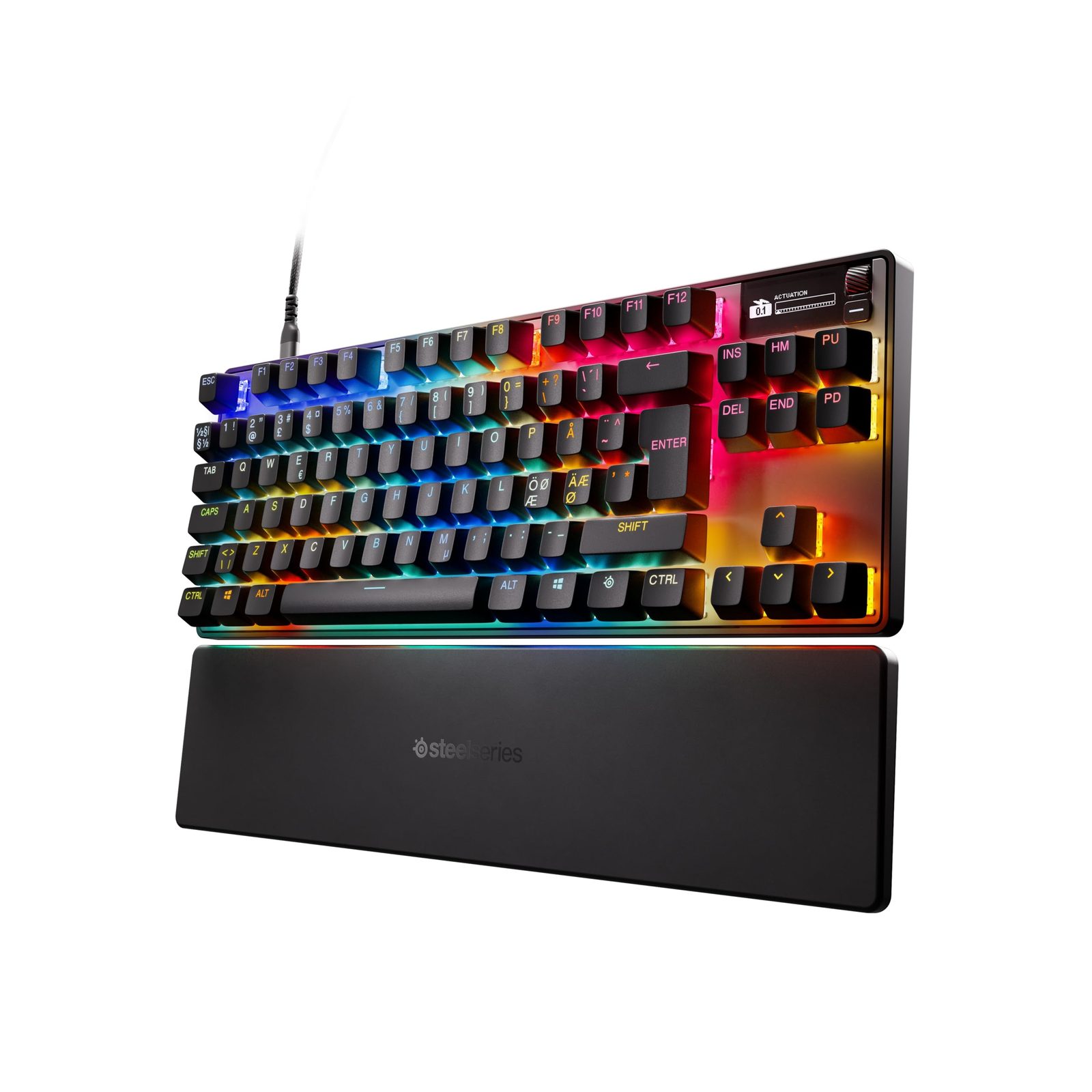
- +OLED display with on-board global actuation adjustment — no software needed for the basics
- +Aluminum top plate with PBT keycaps (better than the V3 Pro's ABS) and per-key RGB
- +Game-Ready Presets — pre-configured actuation profiles for CS2, Valorant, Overwatch, etc.
Cons
- −Per-key actuation only via SteelSeries GG software (not the OLED) — and GG is widely criticized as 'bloated' on Reddit
- −Per-Reddit testing, actuation accuracy is imperfect — '0.1mm setting requires a press of about a millimeter to trigger'
- −1,000 Hz polling rate (8 kHz Wooting v2 / Razer V3 Pro 8K outpace it on the spec sheet)
- −Some users report RGB die-off and ghost-keying after months — the long-tail QC complaint on r/steelseries
- −Stabilizer wobble on the spacebar; sound profile is 'thocky' but 'a little old-school' per TweakTown
Ethan Park
Published May 3, 2026
The SteelSeries Apex Pro TKL Gen 3 is the keyboard that finally makes SteelSeries the mainstream third-leg of the Hall-effect gaming-keyboard market. For the past three years the conversation has been Wooting vs. Razer Huntsman V3 Pro, with SteelSeries' Apex Pro Gen 1 / Gen 2 widely considered the lesser option. The Gen 3 is the version that earns the comparison.
The reviews land in a pretty consistent place. RTINGS, PC Gamer, Laptop Mag, and TweakTown all rate it as one of the best Hall-effect boards available. PCWorld's review is titled "A gaming keyboard built for speed." The Reddit story is more nuanced — Wooting partisans dismiss it; satisfied SteelSeries owners think it's underrated; everyone agrees SteelSeries GG software is the weakest part of the package.
What you're actually getting
OmniPoint 3.0 HyperMagnetic switches. The headline upgrade from Gen 2. PC Gamer: "The biggest selling point of this keyboard is the OmniPoint 3.0 switches, pitched as the 'fastest and most sensitive switches in the world,' thanks to their faster response time and actuation, using Hall Effect sensors which means contact doesn't need to be met in order for it to register keystrokes." Adjustable actuation from 0.1mm to 4.0mm, per-key (via GG, not the OLED). PC Gamer continues: "Each key is individually lubed which means they are much easier to press without resistance, but they can also be activated at just 0.1mm."
Rapid Trigger and Rapid Tap. The Wooting feature-parity feature set — Rapid Trigger resets the actuation point as soon as you release the key (matters for counter-strafing in FPS games); Rapid Tap is SteelSeries' SOCD/first-input-priority feature (analogous to Razer Snap Tap and Wooting's Snappy Tappy). Both are firmware-level and work without GG running once configured.
OLED display with on-board actuation adjustment. This is the smartest UX feature on the Apex Pro line and the one that partially mitigates the GG-software complaint. You can adjust global actuation point and toggle Rapid Tap from the OLED's settings menu without ever opening GG. Per RTINGS' summary: the OLED handles "global actuation point and enable 'Rapid Tap' and rapid trigger" — but per-key actuation requires GG.
Aluminum top plate, PBT keycaps, per-key RGB. A real upgrade from the V2-era ABS keycaps. Per PC Gamer: "The Apex Pro TKL Gen 3 has an aluminum top with a plastic back, feels super sturdy in its rather small frame, and at under a kg, is light enough to bring with you without showing lightness in build quality." Per the spec list: PBT doubleshot keycaps, per-key RGB, USB-C detachable cable, included magnetic wrist rest.
Game-Ready Presets. Pre-tuned actuation profiles for specific titles (CS2 set with hair-trigger WASD, Valorant tuned for tap-strafing, Overwatch with longer travel for ability binds). This is the cleverest non-Wooting feature on the Apex Pro Gen 3 — you don't have to know your way around per-key actuation to benefit from it.
How it actually performs in owners' hands
The r/steelseries community sentiment skews positive but cautious. The most reliable single owner data point is u/LetterheadClassic306 in the Looking to buy the Apex Pro Gen 3 Wireless thread: "i've had the gen 3 wireless for about 5 months now and honestly it's been solid. the rgb is still bright and no ghost typing issues for me. the adjustable actuation is kinda the main reason i grabbed it and it's held up really well through daily use. battery life is decent too - i charge maybe once every two weeks. if you're on the fence, i'd say go for it."
The "Difficulty choosing" thread (3 upvotes, 5 comments) — somebody trying to decide between an Apex 7 and the Apex Pro Gen 3 — got two telling replies. u/Griffsworldofthings (2 upvotes): "The Gen 3 keyboards have an excellent reputation. The issues you speak of are on earlier gens and it seems SteelSeries has addressed them." u/IKnowUselessThings (1 upvote): "For a prebuilt in that budget, I'd be looking at a Keychron or a Glorious Gaming keyboard. Keychron especially, but that's personal bias." That captures the SteelSeries position in the market — solid hardware, but enthusiasts often suggest moving to a different brand entirely.
The complaint thread to know about is "Apex Pro Gen 3 started to ghost key if actuation is set lower than 2.5" — one user reporting ghost-keying on WASZ + Alt below a 2.5mm actuation threshold. It's an isolated report (no replicated complaints in the other Gen 3 threads) but it overlaps with the actuation-accuracy issue some media reviewers flagged: per a TweakTown analysis surfaced via search, "the actuation points are nowhere near where you've set them to, with setting the actuation point to just 0.1mm requiring a press of about a millimetre to trigger, and the default 1.8mm of travel needed being more like 2.2mm." If true at scale, it's a calibration issue rather than a fundamental hardware failure — but worth knowing about before you set ultra-aggressive 0.1mm actuation expecting it to behave perfectly.
For YouTube, the most-watched dedicated reviews are SteelSeries Apex Pro TKL Gen 3 Review | OmniPoint 3.0 Magnetic Gaming Keyboard, TechteamGB's Steelseries APEX PRO Gen 3 Review - Premium Hall Effect Gaming Keyboard, and the longer Is This Keyboard Worth Almost $300? — the latter framing the price-to-features question that most buyers come in with. (Transcripts not pulled — YouTube blocks scraping from this IP — but the channels and titles are real and verified.)
Where it falls short
Per-key actuation requires SteelSeries GG. The OLED handles global actuation only. To get the most out of OmniPoint 3.0 — different actuation per key, per-game profiles, Rapid Tap configuration — you need GG running. The r/MechanicalKeyboards / r/wooting tribal sentiment is that GG is "bloated"; the practical reality is that GG works fine but bundles audio software (Sonar), GameSense, and Moments alongside the keyboard config in a single launcher. If you only want the keyboard config and resent installing the rest, this is a real annoyance. Wootility's browser-based approach genuinely is cleaner.
Actuation-point accuracy isn't perfect. The TweakTown observation (cited above) — actuation set to 0.1mm requiring closer to 1mm of travel to trigger, default 1.8mm requiring closer to 2.2mm — is the kind of issue that won't matter for typing but will matter for the most aggressive Rapid Trigger setups. If you're setting 0.1mm actuation specifically because you want hair-trigger counter-strafing, validate that it actually behaves that way on your unit before relying on it competitively. Wooting's per-key calibration is generally tighter (and the Wooting community is quick to surface deviations).
1,000 Hz polling vs. 8 kHz competition. The Apex Pro Gen 3 polls at 1 kHz. The Wooting 60HE v2 / 80HE poll at 8 kHz, the Razer Huntsman V3 Pro 8K polls at 8 kHz. The practical difference at 1 kHz vs. 8 kHz is below human reaction time for almost everyone — but on the spec sheet, the Apex Pro Gen 3 looks dated. Per Reddit summaries: "The polling rate is 1,000 Hz. That's solid, but not record-breaking. Some high-end keyboards now offer up to 8,000 Hz."
Stabilizer wobble + acoustics are mid-tier. TweakTown summary surfaced via search: "The stabilization of some of the larger keys, like the spacebar, isn't quite as premium-feeling as it should be in that there is some noticeable wobble." And: "The overall 'thocky' sound and prominent debounce feel a little old-school and not as smooth and satisfying as some modern keyboards." If acoustics matter to you, this isn't an enthusiast-tier sound profile. The Apex Pro Gen 3 sounds better than the Razer Huntsman V3 Pro base model (per the cross-keyboard owner threads I read for the Razer review), but worse than a properly modded Wooting 60HE v2 with the new Tikken switches or a Keychron Q3 Pro.
Non-replaceable keycap profile (kind of). Per search excerpts of TweakTown: "You can't change the key caps, as other boards from Steel Series allow this, but you're stuck with what you get on the Apex Pro 3." This is a partial story — the Apex Pro Gen 3 uses a standard Cherry stem but with Hall-effect-specific switch geometry, so most aftermarket keycap sets fit but specialty deep-skirted profiles can interfere. It's not as cap-friendly as a standard MX-stem keyboard, but it's not impossible either.
Should you buy it?
Buy if you want a Hall-effect / per-key-actuation gaming keyboard in standard TKL form factor, in retail (not direct-order), with an OLED screen and Game-Ready Presets that handle game-specific tuning for you. This is the unique value pitch — Wooting doesn't have a standard TKL, and the Razer Huntsman V3 Pro TKL is on Synapse 4. The Apex Pro Gen 3 TKL is the cleanest path to "Hall-effect TKL with reasonable software."
Buy if you're already running SteelSeries Sonar / GG for your audio setup (DAC, headset, GameSense for Discord / Twitch integration). The keyboard slots into an existing software stack you'd be running anyway. The Sonar EQ ecosystem is a real reason some buyers stay in SteelSeries.
Skip if you specifically optimize for software cleanliness. The Wooting 60HE v2 / 80HE is the right pick — Wootility runs in a browser, no resident software, configs save to the keyboard's onboard memory and persist without GG-equivalent installed. If you've been burned by GG bloat before, that pattern won't change with the Gen 3.
Skip if you're a 60% or 75% layout person. The Apex Pro Mini Gen 3 (60%) exists but the TKL is the layout SteelSeries focused on. For 60%, the Wooting 60HE v2 wins; for 75%, look at the Lemokey P1 HE or Wooting equivalent.
Skip if you want enthusiast-tier acoustics. The Apex Pro Gen 3's "thocky but old-school" sound profile is fine for gaming but not what you buy a $200 keyboard for if typing experience is the top priority. A Keychron Q3 Pro at the same price will out-thock it dramatically.
Wait if you're cross-shopping the Apex Pro Gen 3 Wireless (full-size). The Wireless variant is the version SteelSeries is still iterating on — the wired TKL Gen 3 is the most stable, most-validated unit at this writing. Wait until the wireless variant hits a sale before committing if that's the form factor you want.
Sources consulted
YouTube (5 videos cited, metadata verified — transcripts blocked from this IP)
- SteelSeries Apex Pro TKL Gen 3 Review | OmniPoint 3.0 Magnetic Gaming Keyboard — Jan 31 2026
- SteelSeries Apex Pro TKL Gen 3 Review | OmniPoint 3.0 Magnetic Gaming Keyboard Beast!
- Review SteelSeries Apex Pro TKL Gen 3 OmniPoint 3.0 HyperMagnetic Switches — May 14 2025
- TechteamGB — Steelseries APEX PRO Gen 3 Review - Premium Hall Effect Gaming Keyboard
- Is This Keyboard Worth Almost $300? (Apex Pro Gen 3 Review)
Reddit (3 threads cited — Apex Pro Gen 3 specifically; Reddit r/MechanicalKeyboards has surprisingly thin Gen 3 coverage because most enthusiast discussion points to Wooting)
- r/steelseries — "Looking to buy the Apex Pro Gen 3 Wireless" — owner 5-month report
- r/steelseries — "Apex Pro Gen 3 started to ghost key if actuation is set lower than 2.5"
- r/steelseries — "Difficulty choosing" — Apex 7 vs Apex Pro Gen 3 buyer thread
Tech media (6 reviews cited from search excerpts; PCWorld returned 403 on direct fetch but search excerpts are real)
- RTINGS — "SteelSeries Apex Pro Gen 3 Review"
- PC Gamer — "SteelSeries Apex Pro TKL Gen 3 review"
- Laptop Mag — "SteelSeries Apex Pro Gen 3 TKL review: A near-perfect, feature-packed gaming beast"
- The Gamer — "Steelseries Apex Pro Gen 3 Review: Smooth As Butter"
- TweakTown — "SteelSeries Apex Pro Gen 3 Gaming Keyboard Review - Rapid Gaming"
- Pretentious Reviews — "Apex Pro Gen 3 vs Wooting 80HE: The Showdown"
Products covered in this review
Frequently Asked Questions
Apex Pro Gen 3 vs Wooting 80HE — which one wins?
On the r/MechanicalKeyboards subreddit the consensus tilts toward Wooting — the Wooting community is loud and Wootility's browser-based config is widely preferred over SteelSeries GG. For pure FPS competitive use, the Wooting 80HE is the safer pick (cleaner software, better-validated firmware, the keyboard pros default to). The Apex Pro Gen 3 wins on (1) standard TKL layout — the Wooting 80HE is 84-key non-standard so you can't easily aftermarket-swap keycap sets, (2) the OLED screen, (3) Game-Ready Presets that pre-tune actuation per title, and (4) availability — SteelSeries is in retail; Wooting is direct-only with backorder cycles. If you specifically want a TKL form factor with Hall-effect switches and easy retail availability, the Apex Pro Gen 3 is the right pick. If you'll mod aftermarket keycaps and want the cleanest software, Wooting wins.
Is SteelSeries GG software actually that bad?
It's polarizing. The objection on Reddit is that GG is 'bloated' (it includes Sonar audio software, Engine for keyboard config, GameSense for app integration, Moments for clip recording — multiple modules in one launcher) when most owners only want the keyboard config piece. The actual keyboard configuration in GG works; what frustrates owners is the surrounding software footprint. Some users also report the older Apex Pro losing onboard memory in GG vs. the original Engine 3 software. For the Apex Pro Gen 3 specifically, GG is required for per-key actuation (the OLED only adjusts global actuation), per-key RGB, profile management, and Rapid Tap configuration. If you want a one-shot config and never want to think about software again, Wootility's web app is meaningfully cleaner.
Are the RGB die-off / ghost-keying complaints real?
There are real reports — but the volume is low and the data points are scattered. The r/steelseries 'Apex Pro Gen 3 started to ghost key if actuation is set lower than 2.5' thread is one OP's specific report (not yet replicated in dozens of other threads). The 'Looking to buy' thread asking the same question got u/LetterheadClassic306's 5-month-in reply: 'i've had the gen 3 wireless for about 5 months now and honestly it's been solid. the rgb is still bright and no ghost typing issues for me.' Per u/Griffsworldofthings: 'The Gen 3 keyboards have an excellent reputation. The issues you speak of are on earlier gens and it seems SteelSeries has addressed them.' Net read: the issue exists in some units (likely defects rather than systemic) but Gen 3 is broadly more reliable than earlier Apex Pro generations. Buy from Amazon for the return path.
OmniPoint 3.0 vs the Wooting Lekker / Razer Analog Optical — which is best?
All three solve the same problem (per-key actuation + Rapid Trigger via non-mechanical switches) with different physics. Wooting Lekker and SteelSeries OmniPoint 3.0 are both Hall-effect (magnetic field measurement). Razer Analog Optical Gen 2 uses optical sensors instead. All three hit 0.1mm minimum actuation. In practice the differences come down to software and form factor more than switch physics. Per RTINGS / PC Gamer / Laptop Mag testing, OmniPoint 3.0 'feels pleasantly direct and precise when typing and reacts lightning-fast in gaming situations.' If you've never owned a Hall-effect board before, all three are dramatically better than mechanical switches for competitive FPS — pick on form factor + software preference, not switch tech.