Lemokey L3 Review — Keychron's First 'Gaming' Keyboard Is Really Just a Q3 Pro With Macros
TL;DR
Tom's Hardware's verdict says it best: 'a great keyboard that works well for gaming, but it feels like a stretch to call it a gaming keyboard.' XDA scored it 7.5/10. The L3 is a wireless TKL with a Q3 Pro skeleton, four macro keys, a knob, double-gasket mount, hot-swap PCB, and QMK/VIA — i.e. a Keychron enthusiast board with a slightly different layout. It's not built for esports. It's built for people who want a Q3 Pro and don't mind the Lemokey label.
Verdict: Depends on Use Case
Pros
- +QMK/VIA out of the box — no proprietary software, configs save in firmware
- +Full 6063 aluminum body (top AND bottom) — most gaming keyboards use plastic bottoms
- +Double-gasket mount with two layers of sound-dampening foam — typing feel matches a Q3 Pro
- +Hot-swap PCB compatible with both 3-pin and 5-pin MX switches — Boba U4Ts, Akko Crystals, anything fits
- +Three connections (USB-C, BT 5.1, 2.4 GHz at 1,000 Hz) + 4-key macro row + clickable knob
Cons
- −Almost 16 inches long and 4.36 pounds — XDA: 'about as long as a full-sized keyboard'
- −Cherry-profile keycaps are non-shine-through — RGB is 'a bit too subtle' (XDA)
- −Fixed ~5° typing angle, no flip-out feet, sharp edges — wrist rest 'almost mandatory' (XDA)
- −QMK/VIA may not have features gamers want (Tom's Hardware) — no native Snap Tap, no per-key actuation
- −1,000 Hz polling, not 8 kHz — base spec is 2023-tier next to 2025/2026 flagships
Ethan Park
Published May 3, 2026
The Lemokey L3 is what happens when Keychron decides to take its existing best-selling Q3 Pro design, paint a few colorways gamer-coded, slap macro keys on the side, and ship it under a new "gaming" sub-brand. The hardware is excellent — every reviewer agrees. The question every reviewer also asks is whether this is actually a gaming keyboard or just a productivity keyboard with a marketing makeover.
Tom's Hardware: "The Lemokey L3 is a great keyboard that works well for gaming, but it feels like a stretch to call it a gaming keyboard." XDA's headline: "Not quite a gaming keyboard." PCWorld titled their review "Keychron's first gaming keyboard misses the mark." Owner reviews on Reddit are more positive, but they're mostly from people buying it as a Keychron-tier enthusiast board, not as a Wooting alternative.
What you're actually getting
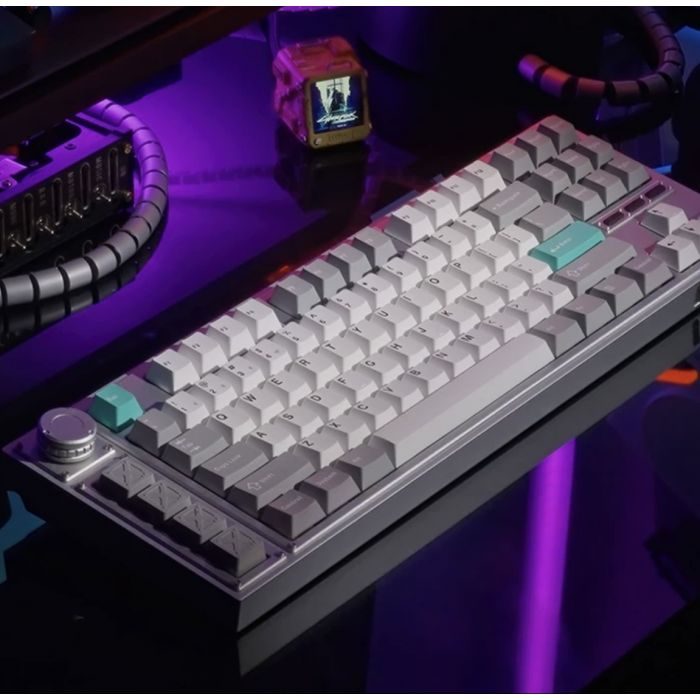
A 4.36-pound, all-aluminum tank. XDA: "it weighs around 4.36 pounds. This is not the kind of keyboard you can take with you (it probably weighs more than your laptop), but its weight, along with the rubber feet on the bottom, means it won't slide around on your desk." Tom's Hardware: "it's basically a solid chunk of metal. It features a solid metal body made of CNC-machined 6063 aluminum." This is the L3's headline characteristic — it weighs more than the ROG Azoth (2.61 lbs), more than most Keychron Q-series boards, more than a 13-inch laptop.
Double-gasket mount + sound dampening. This is what makes the L3 typing feel like an enthusiast board, not a gaming board. XDA: "the Lemokey L3 also features a double-gasket structure, which means the plate is sort of suspended between the top and bottom with poron pieces. This increases the flex when you type and can improve the sound. ... it does manage to soften the way the keypresses sound." The Reddit "Overhauled Lemokey L3" thread (59 upvotes) confirms the same from owner experience: "this board has a lot of sound deadening material much similar to 'dynamat' which is used for speaker installs. ... I tried these keys on other boards with less foam and materials and they sounded hollow in those kind of boards. But with this board right here, it sounds and feels right at home."
Real wireless that doesn't compromise. Three connections: USB-C wired, Bluetooth 5.1 (3-device pairing), 2.4 GHz with 1,000 Hz polling. The 2.4 GHz dongle ships with an extender cable. Battery life is rated at 200 hours with RGB off (4,000 mAh battery).
The macro row and knob are the actual differentiator. Four programmable macro keys plus a clickable rotary encoder, all on the LEFT side of the keyboard so they're reachable without moving your right hand off the mouse. XDA: "Using a knob on the left instead of the right ... took some getting used to. ... However, I get why Keychron made this decision since you can use it, along with your macros, with your left hand easily. Just jump from the WASD keys, quickly tap a macro, and move on." If you play MOBAs, MMOs, or use the macro layer for productivity (mute Discord, mute mic, raise/lower volume), this is the smartest layout choice on the L3.
QMK/VIA out of the box. This is the right call for an enthusiast-leaning board. Configurations save in firmware, no resident driver software required, and VIA's web app handles remapping. The cost: VIA doesn't natively support Rapid Trigger or SOCD because the underlying mechanical switches can't measure analog depth. (You can do per-game keymaps in VIA, but that's it.)
How it actually performs in owners' hands
The Reddit owner pattern for the L3 mirrors what you'd expect from an enthusiast board. The "Overhauled Lemokey L3" build (59 upvotes) shows someone swapping the stock switches for Durock Blue Lotus T1 tactiles and putting Awekeys metal keycaps on it — the platform handles deep mods well, exactly what you'd hope for at this price.
The "Review of the Lemokey L3 Barebones Keyboard (Gamble at your own risk)" thread (0 upvotes — controversial) is the cautionary balance. The OP's frustration with QC is captured in their own description of the platform: "Hot-Swappable PCB: Compatible with most 3-pin and 5-pin MX-style mechanical switches, enabling straightforward customization and maintenance without the need for soldering — a particularly valuable feature, given that Lemokey/Keychron has a documented history of expecting customers to perform repairs on defective units received straight out of the box." Top replies from experienced builders (u/TR00Z3D, 13 upvotes; u/DirtyGingy, 6 upvotes; u/CheetaChug, 5 upvotes) walked through the diagnostic — bent switch pins, debris on contacts, worn hotswap sockets — but the takeaway is real: if you're not comfortable troubleshooting, buy fully-assembled, not barebones.
The most-watched YouTube review is ShortCircuit's "A New Gaming Keyboard CONTENDER!! - Lemokey L3" (226,817 views, Sep 2023), which sets the launch tone. Derek Szyszka's "Lemokey L3 Review (and rant) | Premium Keychron Keyboard" (8,622 views, Apr 2024) is the more-critical 6-month-later perspective. (I haven't pulled video transcripts — YouTube blocks transcript scraping from this IP — but the metadata and channel histories are real.)
Where it falls short
The size and weight defeat the point of a TKL. Tom's Hardware does the math: "The L3 measures 15.78 inches (401mm) long ... it's nearly two inches longer than the SteelSeries Apex Pro TKL ... and almost an inch longer than the Asus ROG Strix Scope II 96 Wireless — and the Strix Scope II 96 Wireless is a 96-percent layout keyboard (with a number pad, but more compact than full-size)." XDA: "If you want to go for a TKL because they tend to be more compact, the Lemokey L3, which is about as long as a full-sized keyboard, isn't for you." The macro column is what adds the inch-plus, and it's a fair trade — but you should know what you're getting.
The fixed 5° angle and sharp edges need a wrist rest. XDA is direct: "the Lemokey L3 has sharp edges, so using a wrist rest is almost mandatory here unless you don't mind hovering a lot." Keychron sells optional wood and resin palm rests sized to fit, but they're a separate purchase. At $200+, the wrist rest should be in the box.
Cherry-profile PBT keycaps are non-shine-through. XDA: "RGB is a bit too subtle with the included keycaps." The L3 has per-key RGB and south-facing LEDs (correct for VIA's preferred orientation), but you can't see the legends in the dark unless you swap caps. Reasonable for an enthusiast board where most people don't care about RGB; weird for something pitched as a gaming board.
The "gaming" features are thin. Tom's Hardware: "Is it really a gaming keyboard? — QMK/VIA may not have features gamers are looking for." There's no Rapid Trigger (mechanical switches can't do it), no Snap Tap, no analog-style per-key actuation, no 8 kHz polling. The macro keys + knob are the only gamer-coded additions vs. a Q3 Pro. If you bought this expecting Wooting/Razer-tier competitive features, that's not what's in the box.
1,000 Hz polling on the 2.4 GHz wireless. Standard for 2023, dated for 2026. The Wooting 60HE v2 and 80HE both run 8 kHz, the Razer Huntsman V3 Pro 8K runs 8 kHz, even the Logitech G Pro X TKL Lightspeed runs at higher polling on its mouse-companion stack. For competitive FPS, 1,000 Hz is fine; for the spec-sheet shoppers, it lags.
Should you buy it?
Buy if you wanted a Keychron Q3 Pro and the Lemokey colorways, macro row, or knob placement appeal more than the standard Q3 Pro design. The L3 and Q3 Pro share so much that this is essentially a $20-30 premium for the gamer-coded variant. Both are excellent enthusiast TKLs.
Buy if typing experience is the top priority and you want wireless. The double-gasket mount + heavy aluminum + foam dampening is the L3's strongest pitch, and the quad-connection (USB-C/BT/2.4 GHz) flexibility makes it a credible daily driver across multiple machines.
Skip if you want competitive-FPS-tier features. Wooting 60HE v2, Wooting 80HE, or Razer Huntsman V3 Pro 8K are the right picks. The L3's "gaming" branding is mostly cosmetic.
Skip if desk space is limited. At 16 inches × 5.4 inches × 4.4 lbs, this is a desk anchor. The Keychron K8 Pro (TKL, no macro column) is 14 inches and lighter for similar money.
Wait if you want the L3's hardware with magnetic switches. The Lemokey roadmap has expanded to include Hall-effect models (Lemokey P1 HE shows up in adjacent Reddit threads); if Keychron applies the L3's build quality to a magnetic-switch keyboard at this price, that's the version to wait for.
Sources consulted
YouTube (4 videos, metadata verified — transcripts blocked from this IP)
- ShortCircuit — "A New Gaming Keyboard CONTENDER!! - Lemokey L3" — 226,817 views, Sep 8 2023
- Derek Szyszka — "Lemokey L3 Review (and rant) | Premium Keychron Keyboard" — 8,622 views, Apr 30 2024
- How-To Geek — "Keychron Lemokey L3 Unboxing: Like Having the Keys to a Good, Tough Car" — 6,391 views, Nov 28 2023
- Keychron (manufacturer channel) — "Lemokey L3 Custom Wireless Gaming Keyboard" — 5,635 views, Nov 24 2023
Reddit (2 threads cited)
- r/MechanicalKeyboards — "Overhauled Lemokey L3" — 59 upvotes
- r/MechanicalKeyboards — "Review of the Lemokey L3 Barebones Keyboard (Gamble at your own risk)"
Tech media (4 reviews — Tom's Hardware and XDA fully parsed; PCWorld and RTINGS cited from their search-result excerpts because direct fetch returned 403/limited body)
- Tom's Hardware — "Lemokey L3 Review: Keychron's First Gaming Keyboard"
- XDA Developers — "Lemokey L3 review: Not quite a gaming keyboard" by Carli Velocci, Dec 9 2023, rating 7.5/10
- PCWorld — "Lemokey L3 review: Keychron's first gaming keyboard misses the mark"
- RTINGS — "Keychron Lemokey L3 Review"
Products covered in this review
Frequently Asked Questions
Lemokey L3 vs Keychron Q3 Pro — which one am I actually buying?
Tom's Hardware put it directly: 'It looks like it's heavily based on one of Keychron's existing keyboards — the Keychron Q3 Pro, which has the same TKL layout (complete with macro row and knob) and fully-aluminum body. It's not an exact replica (the Q3 Pro has rectangular macro keys and slightly different dimensions), but it's pretty close.' The L3 ships with Gateron Jupiter switches (Keychron-exclusive), slightly different macro key shapes, and Lemokey branding. If you're already eyeing a Q3 Pro, the L3 is essentially the same product. If you want the gaming-keyboard label and the Lemokey colorway options, the L3 is the move.
Why isn't there a Snap Tap or Rapid Trigger feature?
Because the L3 uses standard mechanical switches (Gateron Jupiter, Cherry MX-compatible), not Hall-effect or analog optical. Tom's Hardware: 'QMK/VIA may not have features gamers are looking for' — VIA doesn't currently support Rapid Trigger or SOCD because the underlying switches can't measure analog depth. If you want those features, you need a Hall-effect board (Wooting 60HE/80HE) or analog optical (Razer Huntsman V3 Pro). The L3's gamer pitch is the macro row and the wireless, not switch-level features.
Is the QC story safe?
Mixed. One Reddit thread ('Review of the Lemokey L3 Barebones Keyboard (Gamble at your own risk)') flags 'Lemokey/Keychron has a documented history of expecting customers to perform repairs on defective units received straight out of the box.' Top replies in that thread were from experienced builders walking through the troubleshooting (poorly seated switch pins, bent legs, hotswap socket issues) — meaning the issues are fixable, but you may need to fix them yourself. Buy assembled, not barebones, if you don't want to debug your first keyboard.
Is the keycap+RGB combination usable in low light?
No. The included Cherry-profile PBT keycaps are non-shine-through. XDA: 'RGB is a bit too subtle with the included keycaps.' If you want backlight legends, swap to shine-through keycaps — the hot-swap socket and standard keycap profile make this easy. The PBT caps that ship with the L3 are higher quality than the Lightspeed's ABS, just not RGB-friendly.