Keychron Q1 Pro Review — A Bouncy, Heavy Aluminum 75% That Reviewers Keep Calling 'Comfortable'
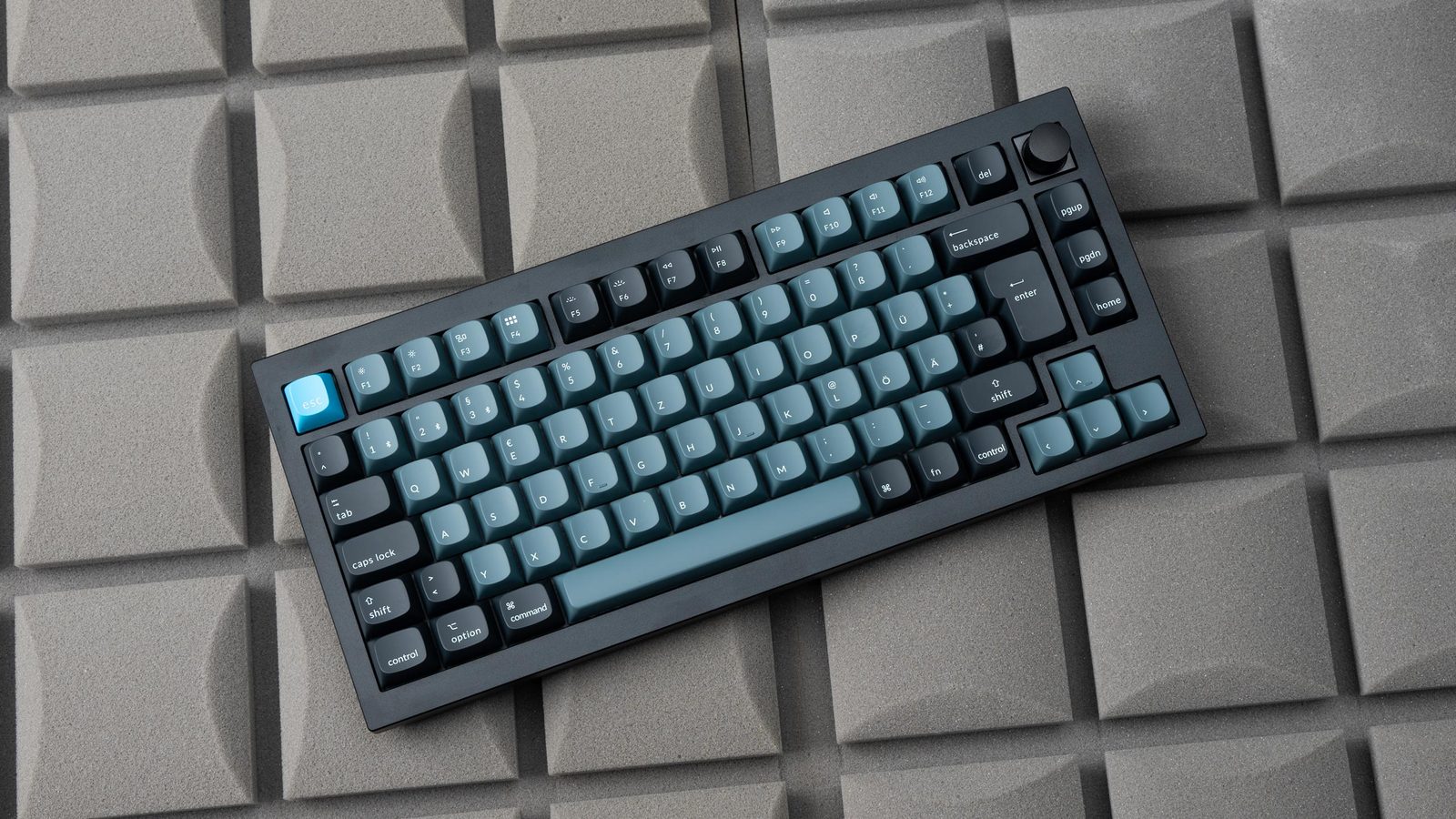
TL;DR
Reviewers across YouTube, Reddit, and tech media converge on the same picture: the Q1 Pro is a heavy, well-built, comfortably-bouncy 75% with stable Bluetooth and QMK/VIA — but stock acoustics are uneven (notably the space bar), the KSA keycaps are unusually tall, and Keychron's RMA process is a known pain point. It's the keyboard most reviewers say is worth $200 if you type a lot, and not if you don't.
Verdict: Buy
Pros
- +Polycarbonate plate + double-gasket mount produces visible flex and a soft, low-fatigue typing feel
- +All-aluminum CNC case feels premium and stays planted (3.8 lbs / 1.7 kg)
- +Bluetooth 5.1 connection is stable — multiple reviewers report no perceptible latency
- +QMK/VIA out of the box — no proprietary software lock-in
- +Hot-swap PCB plus screw-in stabilizers makes switch/stab work easy
Cons
- −Stock space bar is pingy and rattly across multiple reviews — the most consistent complaint
- −KSA keycap profile is unusually tall; takes acclimation and forces a wrist-up posture without a rest
- −No 2.4 GHz wireless option (Bluetooth only, with wireless polling capped at ~90 Hz)
- −$199–$219 is steep for a board that 'still requires a little tinkering to sound its best'
- −Keychron RMA experience is a known weak spot — owners report slow, troubleshoot-heavy support
Ethan Park
Published May 3, 2026
The Q1 Pro is the consensus answer to "I want a real custom keyboard but I don't want to build one." It's a 75% gasket-mounted aluminum board with hot-swap, QMK/VIA, and Bluetooth — none of which is unique in 2026, but Keychron was the first to ship the bundle at $200 and the reviews have aged well.
I read every English-language review I could find — three substantive YouTube reviews (with full transcripts), seven Reddit threads with real owner opinions, and four tech-media reviews. The picture is remarkably consistent: heavy, bouncy, comfortable to type on, slightly imperfect out of the box, and reliable enough that two-year-old owner threads are mostly still positive.
What you're actually getting
Three things define the typing experience, and reviewers agree on all three.
The plate flex is real. The Q1 line uses a polycarbonate plate (not steel) with a double-gasket mount — a silicone pad between the upper and lower cases on top of the plate gasket. SemiPro Tech+Gear, comparing it to the original Q5: "even without typing heavily you can see the whole thing bouncing up and down it's Got That Bouncy softer typing feel that's less fatiguing it just feels really nice to type on" (video). Tom's Guide built its entire review around this: "The Keychron Q1 Pro looks gorgeous and feels it too thanks to a bouncy plate and KSA profile keycaps" (review).
It's heavy. 3.8 lbs / 1.7 kg of CNC'd 6063 aluminum. Tom's Guide: "the Q1 Pro is destined to be either an anvil or a desk ornament, and won't be much use to anyone who requires otherwise" (review). This is a feature if you want a board that doesn't slide under aggressive typing, and a bug if you ever want to take it anywhere.
Wireless works without drama. Bluetooth 5.1, three-device pairing, 4,000 mAh battery. SemiPro Tech+Gear: "I've had a really good experience using the q1 pro over Bluetooth for the last week it has not had any issues with latency or lag" (video). AppleInsider rates the wireless implementation 4.5/5 overall and notes: "We didn't experience any lag or control issues when using the keyboard for our daily typing. We pounded out at least several thousand words and it performed as expected." (review)
The wireless caveat: it's Bluetooth-only, no 2.4 GHz dongle. SemiPro flags this as the first item on the cons list: "no 2.4 gigahertz connection probably not a surprise to hear me say that I wish it had one." For typing the Bluetooth latency is a non-issue; for FPS gaming, plug in the cable.
How it actually performs in owners' hands
Reddit is where the long-term picture sharpens. The 350-upvote thread "First Mechanical Keyboard. Keychron Q1 Pro" is mostly enthusiastic ("Keychron is just so fricken' good right now with all of their form factor options under one banner" — u/s9oons, 39 upvotes), and the tone in the dedicated r/Keychron subreddit follows suit. But the substantive threads aren't the unboxings — they're the buying-advice ones.
The "Is the Q1 Pro worth to get for 1st mechanical keyboard?" thread (47 upvotes, 30 comments) is split. The most-upvoted reply (u/ojassed, 11 upvotes): "I think for most of us here, we'd have a couple of boards already before deciding on the Q series, or it being our first 'custom' board. If you go for the utility factor, then it's prudent to start with something less expensive like the K series." The recurring counter-recommendation is the V1 — same layout, plastic case, ~$100 less, "great value" (u/phillipjpark, 7 upvotes). u/anhphamfmr (5 upvotes) frames the gasket-mount upsell honestly: "Q series is gasket mount, it will blow away all K, K Pro, V (all tray mount) in terms of type feeling and sound."
That's the honest summary: the Q1 Pro's bounce is real, but you're paying a premium specifically for gasket-mount and aluminum. If neither matters to you yet, the V1 is the cheaper entry.
Where it falls short
The space bar. It's the single most consistent complaint. Michael Caputo's review concludes the section on stock sound by saying it's mostly good "minus the space bar. The space bar is a little bit too pingy for my own personal preference" (video). On Reddit, u/bbrown731 (4 upvotes) typed it bluntly in the Kickstarter unboxing thread: "Backspace key is a bit pingy but other than that most of the keys have a good deep sound." SemiPro's wrap-up of the cons: "I think it still requires a little tinkering to sound its best ... the space bar not awful but also not fantastic there's some rattle in there" (video).
For a $200 prebuilt this is the most legitimate gripe. Pulling the stabilizers and applying a thin coat of dielectric grease fixes it in 20 minutes — and the board is hot-swap with screw-in stabs explicitly to make that easy — but you shouldn't have to.
The KSA keycaps are tall. SoulOfTech's review subtitle is literally "Skyscraper Sized Keycaps." Caputo: "they're especially troublesome to type on if you're coming from a low profile keyboard ... You're certainly gonna have errors when you're typing if you have not typed on KSA profiles before" (video). SemiPro warns specifically about ergonomics: "the taller profiles require you to really angle your fingers up in the air to rest on the keycaps and type and that can add a little bit of an uncomfortable angle or uncomfortable fatigue over time." The barebones SKU (no caps, no switches, $20 less) is the right move if you already know you don't want KSA.
Keychron's support is the silent dealbreaker. The "Q1 Pro poor quality control and support" thread documents an OP whose D-key didn't work out of the box and who Keychron forced through socket-swap troubleshooting before agreeing to a replacement. The top reply (u/Sliced_Orange1, 5 upvotes): "Ah yes, keyboard roulette. Unfortunately, Keychron's support team is well known to be subpar and it's simply a game of chance for whether or not something will require their services." u/MBSMD (5 upvotes): "My personal belief is that Keychron is expanding faster than their support services can handle ... Their products are great when they work (typing it on one now), but I'm fully aware that each purchase is a gamble." The community workaround, repeated in every QC thread: buy from Amazon, not from Keychron direct, so you get the 30-day return safety net.
Should you buy it?
Buy if you type for a living, you want gasket-mount bounce and aluminum heft, and Bluetooth pairing across a Mac/PC matters more than 2.4 GHz polling. Trusted Reviews puts it cleanly: "The Keychron Q1 Pro is a sublime mechanical keyboard. The addition of wireless connectivity ensures it offers one of the most complete packages available with a sturdy construction, smooth and tactile switches, and extensive software-based customisation" (review). Buy from Amazon, not direct, so the return path exists if you draw the unlucky unit.
Skip if this would be your first mechanical (start with a Keychron V1 — same layout, mod-able to similar sound, ~$100 less). Skip also if you primarily play competitive FPS and want sub-millisecond polling — wireless caps at 90 Hz, and you'd need to plug in for serious gaming anyway. Skip if you can't tolerate spending an evening lubing the space-bar stabilizer.
Wait if you specifically want 2.4 GHz wireless on a Q-series board — Keychron's Q-Max line adds it for ~$15 more and is the obvious step up if you can find it in stock.
Sources consulted
YouTube (3 videos, all with full transcripts pulled)
- SemiPro Tech+Gear — "Keychron Q1 Pro Review and Mod Sound Test" — 55,406 views, Aug 11 2023
- Michael Caputo — "Keychron Q1 Pro Review: The Ultimate Mechanical Keyboard?" — 38,751 views, Apr 12 2023
- SoulOfTech — "Keychron Q1 Pro Review: Skyscraper Sized Keycaps" — 4,975 views, Dec 24 2023
Reddit (7 threads cited, upvote range 15–350)
- r/MechanicalKeyboards — "First Mechanical Keyboard. Keychron Q1 Pro" — 350 upvotes
- r/Keychron — "Q1 Pro Arrived!" — 86 upvotes
- r/Keychron — "Just got the Q1 Pro from kickstarter. She thicc" — 56 upvotes
- r/Keychron — "Is the Q1 Pro worth to get for 1st mechanical keyboard?" — 47 upvotes
- r/Keychron — "Q1 PRO" (Q1 Pro launch reaction) — 36 upvotes
- r/Keychron — "Q1 Pro poor quality control and support" — 22 upvotes
- r/Keychron — "Q1 Pro - typing delay" — 15 upvotes
Tech media (3 reviews fully parsed)
- Tom's Guide — "Keychron Q1 Pro review: The bounciest of boards"
- Trusted Reviews — "Keychron Q1 Pro Review" by Reece Bithrey, Aug 28 2023
- AppleInsider — "Keychron Q1 Pro review: Finally a wireless & metal mechanical keyboard" by Tyler Hayes, Jan 21 2023, rating 4.5/5
Products covered in this review
Frequently Asked Questions
Is the Q1 Pro a good first 'real' mechanical keyboard?
Reddit consensus is split. The cheaper Keychron V1 is repeatedly recommended on r/Keychron as a better entry point — same layout, mod-able to similar sound, ~$100 less. The Q1 Pro makes more sense if you've already owned a couple of mainstream mechanicals and know you want gasket-mount aluminum and wireless without going full DIY.
Does the wireless feel laggy?
No, by every reviewer's account. SemiPro Tech+Gear used it over Bluetooth for a week with 'no issues with latency or lag.' AppleInsider 'pounded out at least several thousand words and it performed as expected.' One caveat: wireless polling is 90 Hz vs. 1,000 Hz wired, so for competitive gaming you'd plug in.
Why does everyone complain about the space bar?
Stock space bar stabilizers ship under-lubed and the long key amplifies any rattle. Two of the three YouTube reviewers and several Reddit posters call it out specifically. Pulling stabs and re-lubing with dielectric grease takes 20 minutes and fixes it — but for $200 you can reasonably expect not to have to.
Should I buy direct from Keychron or via Amazon?
Multiple Reddit threads recommend Amazon for return safety. Keychron's RMA process has a documented reputation for being slow and forcing customers to disassemble PCBs before authorizing replacement; Amazon's 30-day no-questions return is the fallback most owners suggest.