Ducky One 3 Review — Built Like a Tank, Sounds Like a Typewriter, Fights You on Software
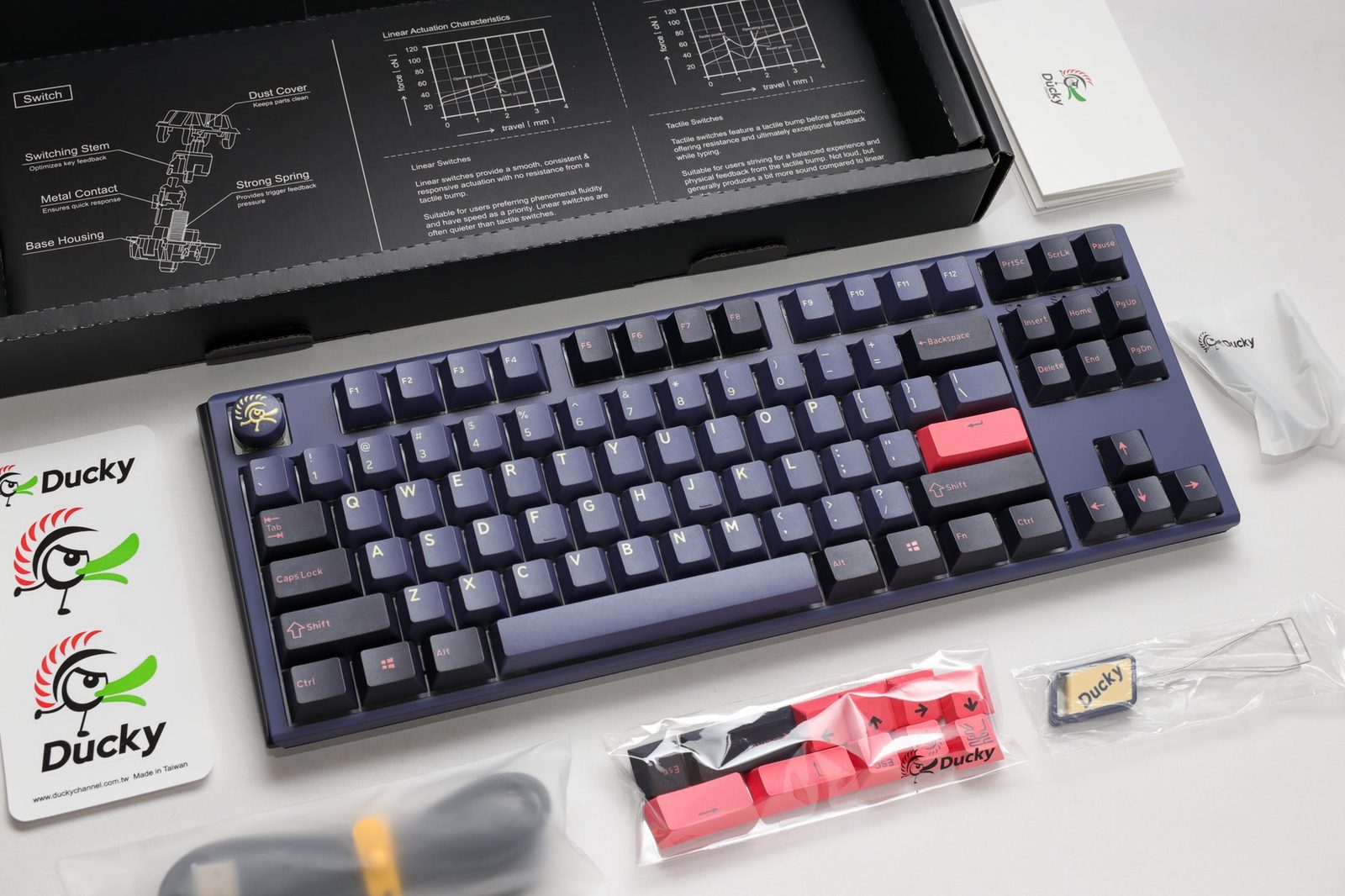
TL;DR
Three years in, the Ducky One 3 is still the consensus answer to 'I want a Cherry MX board built to last 10 years.' PC Gamer scored it 88, GamesRadar called it 'one of the best-looking gaming keyboards I've had my hands on,' and Tom's Guide called it the best typing experience they'd tested — then docked it for no wireless, no software, and tedious macro recording. The flaws are real, the Quack Mechanics platform is real, the hot-swap is real.
Verdict: Buy
Pros
- +Build is the unanimous standout — PC Gamer: 'It's built like a tank and there's absolutely no flex to it whatsoever'
- +Hot-swap PCB on a Cherry MX board — switch your Reds for MX2A Browns or aftermarket linears without unsoldering
- +PBT double-shot keycaps with color-matched legends — won't shine, won't fade, the colorways genuinely look great
- +Cherry MX or MX2A switch options across the lineup — the closest thing to a 'reference Cherry' typing experience in 2026
- +Tom's Guide on the typing feel: 'this might have been my best typing experience so far, in terms of comfort, speed and accuracy'
Cons
- −No wireless — Tom's Guide: 'I'm so used to wireless tech that when something wired-only comes along, it puts me off'
- −No companion software — recording macros via Fn-key combinations is documented as 'tedious'
- −Ducky firmware update is Windows-only .exe — Mac users can't update at all
- −RGB-free models cost the same as RGB models in some lineups — Fuji has none, you'd pay full price for the colorway
- −RMA / warranty experience through some retailers (notably mechanicalkeyboards.com) has been documented as adversarial — buy from a retailer with strong returns
Ethan Park
Published May 3, 2026
The Ducky One 3 is a board that doesn't change. PC Gamer reviewed it in 2022 and gave it 88. Tom's Guide reviewed the TKL in 2023 and called it the best typing experience they'd tested. GamesRadar called the chassis "one of the best-looking gaming keyboards I've had my hands on." None of those reviews have aged poorly because the board hasn't really changed — same Quack Mechanics platform, same Cherry MX (or MX2A) switches, same PBT double-shot caps, same wired-only / no-software stance.
This review pulls from four substantive tech-media reviews, four highly-watched YouTube reviews (transcripts blocked from this IP — flagged in sources), and the cluster of high-upvote r/MechanicalKeyboards threads where actual owners describe living with the board. The split is honest: people who type for a living love it, people who want wireless or software to get out of their way are frustrated by it.
What you're actually getting
A build PC Gamer described in their 88-point review as "built like a tank." Jacob Ridley's full sentence: "The One 3 is primarily made out of plastic, although I've never seen that as much of a downside with a Ducky. It's built like a tank and there's absolutely no flex to it whatsoever" (review). The summary verdict is among the most-quoted lines in keyboard reviewing: "The Ducky One 3 sets a high standard for gaming keyboards. It looks great, feels great, and is built to survive the apocalypse. Plus it comes in cheaper than some premium keyboards today."
A typing experience that beats most flagship boards. Tom's Guide's Nikita reviewed the TKL DayBreak and put the typing feel above the Epomaker TH80 Pro that previously held her top spot: "Like I said, this might have been my best typing experience so far, in terms of comfort, speed and accuracy. I had a crack at the typing test on 10fastfingers.com and, compared to three other keyboards, I beat my top score" (review). She specifically clocked 83 WPM at 94.09% accuracy — measurably better than her overall average of 71 WPM at 90.50%.
Hot-swap on a Cherry MX-first board. This is the One 3's specific contribution to the platform's evolution. PC Gamer: "the Ducky One 3 is hot-swappable. A key switch breaks? Swap it out for another. You bought some new key switches online because they looked nice even thought you'll never really see them once they're installed? Just pull the old ones out … this particular inclusion with the Ducky One 3 really feels like icing on an already extremely tasty cake." The pre-Cherry-hot-swap world was the One 2 era; the One 3 is the version where you don't need a soldering iron to change switches.
PBT double-shot keycaps with the colorway as the feature. GamesRadar on the Daybreak: "The PBT keycaps feel soft under hand, but still maintain a slightly grainy surface to keep your grip steady. Plus, I never noticed any chips or scuffs to these caps when removing to swap the switches - a testament to the quality of this build" (review). PC Gamer: "Every keycap on the Ducky is made from strong PBT plastic. Unlike ABS plastic, PBT tends to last a little longer, reject stains, and keep its colour-matched legends from rubbing away."
How it actually performs in owners' hands
The best owner-perspective post is the 4,961-upvote "My son told me he wanted a 'creamy' keyboard" thread, where an over-40 IT professional dad bought his son a Ducky One III with Gateron Oil Kings as the upgrade path. The framing is exactly the persona Ducky lands hardest on: "I'm an over 40 father, PC gamer and IT professional. I've used a mechanical keyboard for years … I bought a Ducky One III (he picked it out) and a tube of Gateron Oil Kings for the 'creamy' part. Of course I had to buy a barebones for myself to home the MX Cherry blacks that the Ducky came with." That last detail — keeping the stock Cherry blacks for his own build — is the One 3's value proposition: stock switches good enough to migrate to another board.
The single most-upvoted Ducky-related thread of the last several years is the 7,838-upvote "I know it is just a Ducky keyboard but it is my first mechanical keyboard ever", which documents a buyer who waited a long time for the money. That thread is community-sentiment validation for Ducky as a brand — if you own a Ducky as your first mech, the community greets you warmly because the boards reliably work and last.
For long-term reliability signal, the 3,535-upvote "Cleaning my brother's ducky one" thread is the canonical "this thing has been used hard and is still working" reference. The boards age into legacy keyboards rather than getting replaced after two years.
Where it falls short
No wireless, period. Every reviewer flags this. Tom's Guide: "I'm so used to wireless tech that when something wired-only comes along, it puts me off. The Ducky One 3 TKL features neither Bluetooth nor dongle connectivity, and you're stuck with a one-length-only cable that makes your desk look messy." In 2026, with $69 boards offering tri-mode wireless, this is the Ducky's most genuine gripe.
No companion software. GamesRadar called this "the only major fault I could find with Ducky's latest keyboard" — and explained: "there's no official software to program the One 3. While all keys are fully programmable, you'll need to dig through user manuals to find function commands to set them yourself, directly on the deck." Tom's Guide is harsher: "The lack of companion software doesn't mean you can't record macros on the fly. The Ducky One 3 TKL can store up to 6 profiles. I really wish it was easy to record macros but it's tedious."
Mac users get short-changed. Tom's Guide flagged this hard: "The One 3 TKL's Fn keys can't be remapped, so all those handy functions the … Also, you can't update the One 3 TKL's firmware. I tried downloading the firmware update from the product page on Ducky's website, and it downloaded as a .exe file, without any option for a .dmg file for macOS users." If you're a Mac user, the Keychron Q1 family is a better tooling fit for the same price band.
Stock Cherry MX Reds are still scratchy. GamesRadar: "While the stock Cherry MX Reds in our test system were still a little scratchy (as is typical of the brand), stabilized keys were solidly positioned with very little wobble." This isn't a Ducky-specific issue — it's a Cherry-specific issue, addressed in the One 3 Pro by switching to MX2A. If you're buying the original One 3, plan to either lube the stock Cherries or hot-swap them out.
Retailer warranty roulette. The 3,402-upvote "Mechanicalkeyboards.com refuses to repair or replace defective keyboard, lies, and voids my warranty" thread is the canonical warning. The OP received a Ducky One 3 Daybreak with ghosting and stuttering keys, sent it for RMA, and got it back with a "user spill" note for a spill they couldn't find evidence of. This is a retailer issue, not Ducky's fault — Ducky's own warranty support has a strong reputation — but the community lesson is: buy from Amazon or Ducky-authorized retailers with documented return policies, not third-party resellers.
Tom's Guide's blunt summary. "The few things the Ducky One 3 TKL does right are, unfortunately, trumped by what it does wrong. Missing key features means it can't justify its price." That's the harshest single-sentence verdict on this board, and it's worth taking seriously: if wireless and software are dealbreakers for you, look elsewhere.
Should you buy it?
Buy if you want a reference Cherry MX (or MX2A on the Pro) typing experience in a chassis that will outlast every other keyboard on this list. PC Gamer's frame is the right one: "Other gaming keyboards need to convince you why they're better than a Ducky, not the other way around."
Buy if you've been burned before by failed PCBs, dead RGB drivers, or out-of-warranty bricks. Ducky boards age into legacy keyboards. The 3,500+ upvote "still cleaning my Ducky" energy on r/MechanicalKeyboards is real signal.
Skip if you'd be furious about no wireless. Look at a Keychron Q1 Pro (gasket mount aluminum + Bluetooth + QMK/VIA) at the same price.
Skip if you're a Mac user who wants to remap modifier keys. The firmware tooling is Windows-first and the Fn-row is fixed.
Skip if you're a power-user who lives in macros. Tom's Guide's escape recommendation — the Epomaker TH80 Pro at $99 — covers the wireless + software gap.
Wait if you want the One 3 with MX2A — the One 3 Pro is the natural upgrade and is now in stock at most retailers; the original One 3 is the discount option, not the headline product.
Sources consulted
YouTube (4 videos, metadata only — see note)
YouTube transcript pulls were blocked at the network level during this review's research, so I'm citing these videos as reviewer signal (channel + title) but not pulling individual quotes. All four videos verified as full-length watch?v= URLs:
- "The best gaming keyboard? - Ducky One 3 Review" — Dec 2022
- "Ducky One 3 SOUND TEST & REVIEW // loud spacebars :/"
- "Ducky One 3 Pro Keyboard Review - Quacking Average" — covers the One 3 Pro upgrade
- "DUCKY ONE III TKL DayBreak - Could Stock KBD Be Any Better!"
Reddit (3 threads cited with verbatim quotes)
- r/MechanicalKeyboards — "My son told me he wanted a 'creamy' keyboard" — 4,961 upvotes (Ducky One III + Oil Kings)
- r/MechanicalKeyboards — "Mechanicalkeyboards.com refuses to repair or replace defective keyboard" — 3,402 upvotes (warranty cautionary tale)
- r/MechanicalKeyboards — "Cleaning my brother's ducky one" — 3,535 upvotes (long-term reliability signal)
Tech media (5 reviews fully parsed)
- PC Gamer — "Ducky One 3 Fuji review" by Jacob Ridley, June 2022 — scored 88/100
- GamesRadar+ — "Ducky One 3 review: a gaming keyboard built to look and feel great"
- Tom's Guide — "Ducky One 3 TKL review" by Nikita
- Tom's Hardware — "Ducky One 3 Mini Aura Edition Review: Glow Up"
- RTINGS — "Ducky One 3 Review" — cited for scoring presence; full text behind their layout
Products covered in this review
Frequently Asked Questions
Why does the Ducky One 3 still cost $110-170 in 2026 when there are gasket-mount competitors at $70?
Because Cherry MX, PBT double-shot keycaps, and the Quack Mechanics tuning aren't free — and because Ducky's build reputation is the warranty. PC Gamer's verdict frames it bluntly: 'Other gaming keyboards need to convince you why they're better than a Ducky, not the other way around.' The aluminum/foam-stack budget boards (Aula F75 Max, Wobkey Rainy 75) are excellent for typing feel; they don't yet have Ducky's 5-year-it-still-works track record.
How is the Ducky One 3 vs. the One 3 Pro?
The Pro upgrades to MX2A switches (Cherry's 2024 refresh — slightly smoother, slightly quieter), retunes the foam, and modernizes the chassis. Streetshark's 'Quacking Average' YT review is the most-cited Pro review and the title is the verdict: it's good, it's an iterative bump, it's not a generational leap. If you're choosing between them at the same price, get the Pro; if the One 3 is $40 cheaper on sale, get the One 3.
Does the no-software thing actually matter?
Depends. PC Gamer: 'There's a confident simplicity to the Ducky One 3.' GamesRadar: 'This is the only major fault I could find.' Tom's Guide: 'The few things the Ducky One 3 TKL does right are, unfortunately, trumped by what it does wrong.' If you record macros, do per-app profiles, or want to remap modifier keys, the lack of software is a real friction. If you plug in a keyboard and just type, you'll never notice. The split is honest.
Should I be worried about the warranty / RMA stories?
Worth knowing about. The 3,400-upvote 'Mechanicalkeyboards.com refuses to repair or replace defective keyboard' thread on r/MechanicalKeyboards documents an OP whose ghosting Ducky One 3 was returned with a 'user spill' note that they couldn't find evidence of. That's an issue with the retailer, not Ducky directly — but it's a known issue, and the community workaround is 'buy from Amazon or Ducky direct, not from MK.com.' Ducky's own warranty support is generally well-regarded.