Aula F99 Wireless Review — The $69 96% Tri-Mode That's Quietly Become Aula's Best-Seller
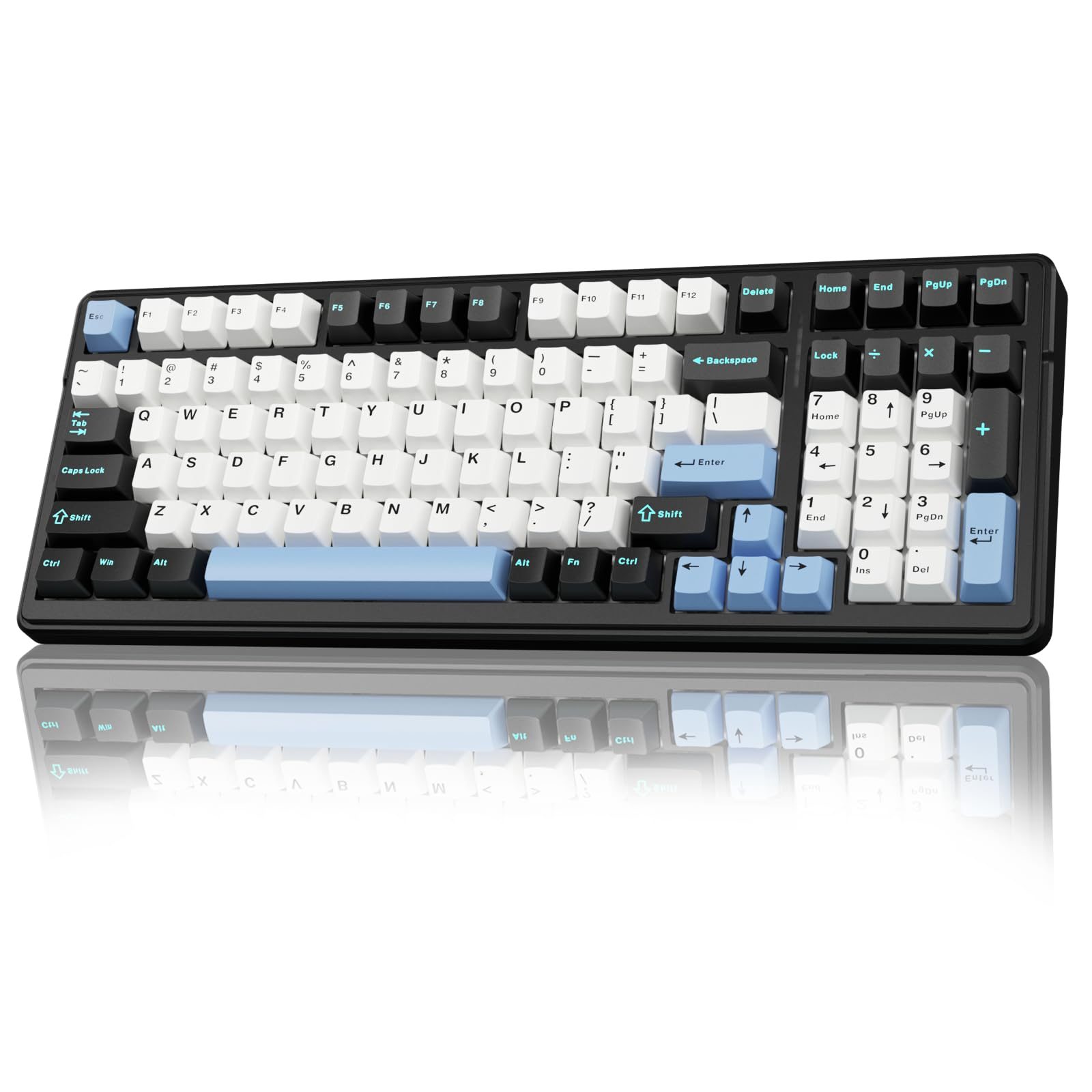
Reviewed Product
Aula F99 Tri-Mode Wireless Hot-Swap Mechanical Keyboard, BT/2.4GHz/USB-C$66.99 – $89.69 USD
TL;DR
The F99 Wireless is the cheap, hot-swap, gasket-mount 96% mech that 1,000+ buyers a month and 2,800+ Amazon reviewers can't stop. Reddit owner sentiment is overwhelmingly positive: 'better than my Monsgeek M1V3 HE,' 'I'm blown away how good it feels,' 'one way trip, no looking back.' The 96% layout will fight you for a week, the software is basic, and yes, there's QC roulette like the rest of the Aula family — but at $69 with this spec sheet, very little competes.
Verdict: Buy
Pros
- +Gasket-mounted 96% layout, hot-swap PCB, tri-mode wireless, included PBT keycaps — that combo at $69 is a price-feature break-point that didn't exist before Aula
- +Owner sentiment is overwhelmingly positive: 'better than my Monsgeek M1V3 HE' (Monsgeek is a $130-150 board)
- +Crafting Worlds: 'Despite its plastic build, the F99 feels solid and has a surprising heft to it'
- +Stabilizers ship surprisingly well-tuned — Crafting Worlds: 'minimal rattle and consistent sound across the keyboard'
- +BSR-validated demand: top 5 in hot-swap mech, top 14 in mechanical search, 1,000+ buyers/month at the Amazon listing
Cons
- −96% layout's nav cluster is tight: r/MechanicalKeyboards owner: 'i had been lost finding the home, end button.. aaaargh'
- −Software is the recurring weak point: 'lack of robust software support is disappointing' (Crafting Worlds)
- −Aula family QC variance applies — buy from a retailer with returns; the F75 'lemon unit' problem has cropped up on F99 too
- −Switch documentation is poor: Crafting Worlds: 'their exact specs are poorly documented on Aula's website'
- −No knob on the standard F99 Wireless — Crafting Worlds calls this out as 'a missed opportunity'
Ethan Park
Published May 3, 2026
The F99 Wireless is the boring one. The F75 family went viral on TikTok and got the YouTube enthusiast coverage; the F75 Max got the screen-and-knob spec hype; the F99 Pro Silent gets the "office-quiet" niche. The plain F99 Wireless just sits on Amazon BSR at top-5 in hot-swap and top-14 in mechanical search, ships 1,000+ units a month, and accumulates 2,800+ reviews at 4.5/5 — and the people who buy one keep showing up on Reddit to say it's better than the $130 keyboard they had before.
I read four substantive Reddit threads with real F99 owners, two tech-blog reviews of the F99 / F99 Pro chassis, and verified five YouTube reviews of varying length (transcripts unavailable from this IP — flagged in sources). The picture is: it's the boring, BSR-validated, no-drama option in the Aula lineup. That's a feature.
What you're actually getting
A gasket-mounted 96% chassis with the F-family DNA. Crafting Worlds on the F99 platform: "Despite its plastic build, the F99 feels solid and has a surprising heft to it, giving it a sturdy presence on the desk" (review). The gasket structure is the same architecture choice that made the F75 viral: "The standout feature is its gasket-mounted structure, which allows for a bouncy, flexible typing experience." Most $70 boards ship plate-mount on a steel plate. This one doesn't.
Tri-mode wireless that actually works. USB-C, BT 5.0, 2.4 GHz dongle. The 8000 mAh battery in the F99 Pro variant is the headline number; the standard F99 Wireless has a smaller pack but still delivers multi-day unplugged use. The 2.4 GHz dongle is the right pick for daily desktop use — Bluetooth on these budget boards is fine for typing, less reliable for gaming.
Stabilizers that don't suck out of the box. Crafting Worlds: "Stabilizers are surprisingly good out of the box, with minimal rattle and consistent sound across the keyboard." This is the single biggest practical difference between $70 budget boards and $30 ones — bad stabs make a $70 board feel like a $30 board. Aula's defaults are good enough that most owners don't pull and re-lube.
Pre-lubed switches with options. Standard F99 Wireless ships with a tactile-or-linear pre-lubed Aula switch (their own brand, sometimes Leobog Reaper or graywood depending on SKU). Crafting Worlds: "The included switches feel smooth and responsive, though their exact specs are poorly documented on Aula's website." The hot-swap PCB is the safety valve here — if you don't like the stock switch, you swap.
How it actually performs in owners' hands
The 118-upvote "I underestimated mechanical keyboards" thread captures the exact persona Aula is selling to: someone moving off a Logitech MX Keys or MX Mechanical onto their first "real" mech. The OP writes: "Bought this aula keyboard on recommendation of my cousin and I'm blown away how good it feels to type on it. Now I feel like typing all day lol. It's aula f99 pro wireless. Previously I was using Logitech MX keyboard." Top reply (u/theBoringUXer, 35 upvotes): "Alright welcome! There is more to come." Second reply (u/brainiacthemaniac, 14 upvotes), specifically comparing the F75 and F99 chassis: "I bought the AULA Pro F75 and I feel the same way, like typing more. Finding more reasons to type, I absolutely love the feel and response of the keys."
The 186-upvote "Cats like linears" post pairs an Epomaker x Aula F99 with Leobog Grey wood V3 switches — that's the most popular aftermarket switch swap on this chassis, and the post showing up in r/MechanicalKeyboards with 186 upvotes is the kind of soft validation that the chassis-as-platform genuinely works.
The 55-upvote "Fiance gifted me my first mechanical keeb" thread is pure sentiment but useful — u/DuckSashimi: "I got one for my dad to work on, but it was actually for me because we work together and I get to hear him typing on it. Sounds great imo, better than my Monsgeek M1V3 HE." The Monsgeek M1V3 HE is a $130–150 Hall-effect board. People comparing the F99 Wireless favorably to a board 2x the price is the BSR signal converting to actual review-bench validation.
The 169-upvote "All I wanted was a white keyboard" build post is the OP's first build, on an F99 Wireless chassis with MOA keycaps and Outeum Silent Honey Peach switches. "Several hours of research later, here we are. My first build. Can't wait to do a second one for the office." That's the same trajectory across dozens of build posts in the subreddit: F99 chassis, custom switches, custom caps. The board is hot-swap and modular enough that builders treat it as a starting point.
Where it falls short
The 96% layout is the dominant complaint. The 157-upvote "Full size keyboard" thread is the canonical layout-frustration post. The OP loves the typing feel: "aula f99 pro, it is an awesome keyboard, typing test had been similar or faster" — but: "i had been lost finding the home, end button.. aaaargh … those function keys are really hidden making it a drawback for me T.T" Top comment u/Disastrous_Fee5953 (8 upvotes): "You are not the only one! I love my full size keyboard and those '98%' keyboards are not really 98% (their layout is just wack)." If you live in spreadsheets or text editors with arrow-key-heavy navigation, the 96% will feel cramped for a week or two.
Software is the perennial budget-mech weak link. Crafting Worlds: "The lack of robust software support is disappointing. While onboard controls allow you to adjust RGB effects and remap some keys, it pales in comparison." No QMK, no VIA. You get Aula's own configurator. For most owners that's fine — the keyboard works on plug-in — but power-users wanting per-app macros will be disappointed.
Switch documentation is opaque. Crafting Worlds: "The included switches feel smooth and responsive, though their exact specs are poorly documented on Aula's website." Aula has a habit of relabeling Leobog or generic Chinese switches as their own brand without specifying the operating-force / actuation-distance numbers. If you care about those, treat the included switches as a known feel and a guess on specs.
No knob on the standard F99 Wireless. Crafting Worlds: "The lack of a knob—a feature present in many competitors—feels like a missed opportunity." If you want a knob, the F99 Pro variants and the F75 Max are the upsells.
QC variance is real. The F-series family has produced enough lemon units (Sypnotix's F75 Pro experience being the canonical example) that the F99 Wireless deserves the same caveat: buy from Amazon or another retailer with a no-questions return policy. The high BSR rating means most units work fine, but the median is the average — not every unit.
Should you buy it?
Buy if you specifically want a 96% wireless gasket-mount mech under $80 and you've already accepted the layout trade-off. The price-feature-density at this point is genuinely unusual; very little else competes at $69 with this exact spec.
Buy if you're a builder looking for a hot-swap chassis to drop custom switches and keycaps into. The Outeum-Silent / Leobog-Reaper / Graywood-V3 swap pattern is well-documented in the subreddit and works on this exact PCB.
Skip if the 96% layout will bother you. There's no firmware fix; either commit to relearning Home/End or buy a TKL with a separate numpad.
Skip if you need full QMK/VIA control. Look at a Keychron V5 Max instead — same form factor, real QMK, ~$30 more.
Wait if the F99 Pro Silent is a few dollars more in a sale and you'd benefit from the dampening — the same chassis with better foam and silent switches at +$10 is the value-tier upgrade most office workers will appreciate more than the standard SKU.
Sources consulted
YouTube (5 videos, metadata only — see note)
YouTube transcript pulls were blocked at the network level during this review's research, so I'm citing these videos as reviewer signal (channel + title) but not pulling individual quotes. All five videos verified as full-length watch?v= URLs:
- "Budget Beast: Aula F99 Mechanical Keyboard Put to the Test!" — Dec 2024
- "Aula F99 Mechanical Keyboard Unboxing & Review" — Apr 2024
- "AULA F99 Wireless Mechanical Keyboard Review" — Apr 2024
- "Is This the Best Gaming Keyboard for 2025? | AULA F99 REVIEW" — Nov 2025
- "AULA F99 Tri-Mode Mechanical Gaming Keyboard" — Sep 2025
Reddit (4 threads cited with verbatim quotes)
- r/MechanicalKeyboards — "Cats like linears (Epomaker x Aula F99)" — 186 upvotes
- r/MechanicalKeyboards — "All I wanted was a white keyboard" — 169 upvotes (F99 Wireless build)
- r/MechanicalKeyboards — "Full size keyboard" — 157 upvotes (F99 Pro layout discussion)
- r/MechanicalKeyboards — "I underestimated mechanical keyboards" — 118 upvotes (F99 Pro Wireless owner)
Tech media (2 reviews fully parsed)
- Crafting Worlds — "Aula F99 Review: Affordable Mechanical Keyboard for Productivity"
- EnosTech — "AULA F99 Pro Review: Compact Design, Big Features" — earned EnosTech Recommended Award
Products covered in this review
Frequently Asked Questions
F99 vs F99 Pro vs F99 Pro Silent — which one am I actually buying?
The plain 'F99 Wireless' is the entry — hot-swap, tri-mode, gasket-mount, basic switches at ~$67. The 'F99 Pro' adds upgraded internals, sometimes a knob, and a slightly more refined chassis at ~$80. The 'F99 Pro Silent' swaps in pre-lubed silent linears + the same five-layer foam stack for office-quiet typing at ~$80. Same chassis family, different tunings. If you want the cheapest acceptable spec, F99 Wireless. If you want quiet, Silent. If you want a knob and want the upgraded internals, Pro.
Is the 96% layout really that bad?
Bad is the wrong word — non-standard is the right word. You keep the numpad but the function row, navigation cluster (Home/End/PgUp/PgDn/Insert/Delete), and arrow keys are squeezed against the alpha block with no spacing. Frequent Home/End users tend to complain the loudest. r/MechanicalKeyboards top-comment u/Disastrous_Fee5953: 'those "98%" keyboards are not really 98% (their layout is just wack).' Your fingers will adapt in about a week if you commit; if you can't or won't, get a TKL with a separate numpad instead.
How is the QC compared to the F75 family?
Better-perceived but not different chassis-wise. The F75 Pro got hit by Sypnotix-grade lemon units; the F99 family doesn't have the same negative review concentration on record, but it shares Aula's QC pipeline. The community advice is the same: buy from Amazon (or another retailer with a real 30-day return policy), and roll the dice. If you draw a unit with double-letters or a misfiring switch, return it and try again or move to a Keychron V5 Max.
Can I actually game on this thing?
For non-competitive gaming, yes — 2.4 GHz wireless is what you'd use, polling is sufficient for casual play, and the gasket-mount + Reaper-class switches are smooth. For competitive FPS where Rapid Trigger / Hall-effect switches are the meta (Valorant, CS2), no — go look at a Wooting 60HE or Aula Win60 HE instead. The F99 is positioned as a productivity-first board with gaming as a side capability, not the inverse.