Aula F99 Pro Silent Review — A 96% Mech That Actually Earns the 'Office-Quiet' Label
Reviewed Product
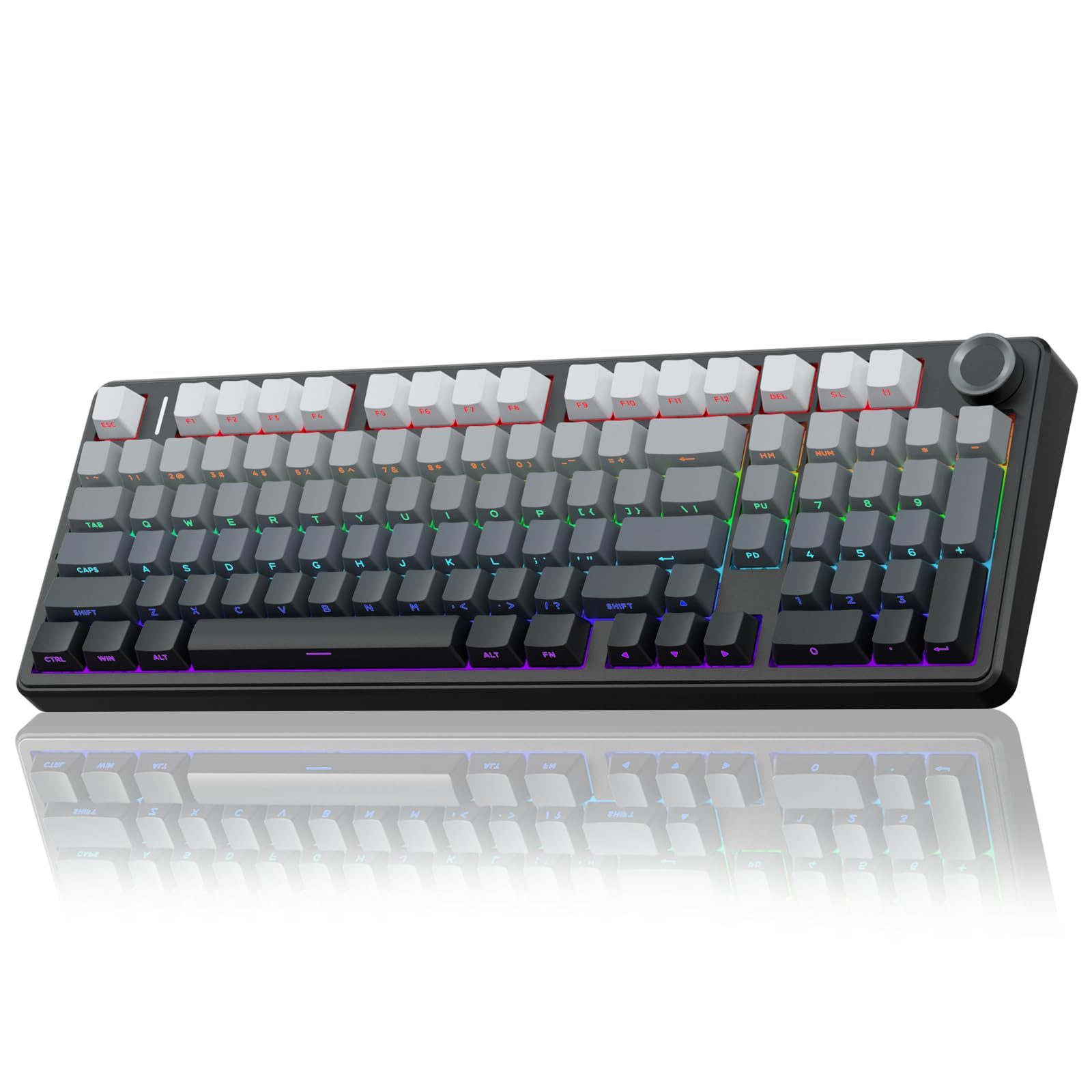
AULA F99 Pro Wireless Mechanical Keyboard - Silent Version, BT/2.4GHz/USB-C$79.89 – $103.86 USD
TL;DR
The Silent variant of Aula's best-selling F99 swaps in pre-lubed silent linears and a five-layer foam stack to land at ~39 dB peak vs. ~62 dB for a normal mechanical. Owners on r/MechanicalKeyboards keep ranking the F99 Pro family above their previous Logitech MX boards. The trade-offs are real: small selfish-key F99 layout quirks, thin English-language review coverage on the Silent SKU specifically, and Aula's usual software polish gap.
Verdict: Buy
Pros
- +Real silent-mech credentials: peak measured ~39 dB vs. ~62 dB for a standard mechanical (per Aula's own and AliExpress wiki testing) — the difference is genuinely office-friendly
- +Five layers of dampening (sandwich foam, IXPE switch pad, PET sound film, bottom foam, silicone case pad) — more layers than most boards 2x the price
- +Pre-lubed silent linear switches plus gasket mount produce 'a low-thrum muffled sound' instead of clack
- +Tri-mode wireless (BT 5.0 / 2.4 GHz / USB-C) with an 8000 mAh battery — multi-week unplugged use is realistic
- +Hot-swap PCB means the silent switches aren't a lock-in — try them, swap if you don't like them
Cons
- −Selfish-key 96% layout: r/MechanicalKeyboards owner: 'i had been lost finding the home, end button.. aaaargh' — Home/End/Insert/Delete cluster is squeezed into a non-standard column
- −Crafting Worlds: 'lack of robust software support is disappointing' — onboard remap works but no QMK/VIA
- −No knob on the standard F99 Pro Silent SKU — 'feels like a missed opportunity' (Crafting Worlds), though some F99 Pro variants do ship with one
- −English-language YouTube and tech-media coverage is heavily weighted toward the standard F99 / F99 Pro, not the Silent variant specifically — some reviewer claims may not transfer 1:1
- −Outeum/Leobog silent switches are quiet but soft — competitive FPS players will want a different switch class entirely
Ethan Park
Published May 3, 2026
The F99 Pro Silent is the F99 family member that justifies its existence by being quiet, not by being cheap. Aula's BSR-popular F99 Wireless covers the budget-typist use case at $66; the F99 Pro Silent at $80 specifically targets the partner-in-the-next-room / open-office / late-night-streamer audience that the regular linear and tactile family members can't serve.
Coverage on the Silent variant specifically is thinner than for the standard F99 — that's the honest spread. Most of the YouTube reviews and the Crafting Worlds / EnosTech tech-media reviews are on the standard F99 Pro, with the Silent SKU sharing the same chassis, foam stack, and software. I'm citing the parent-SKU coverage where it transfers cleanly and flagging where it doesn't.
What you're actually getting
A genuinely quiet typing experience, not a marketing one. The peak-dB measurements that get cited across Aula's and the AliExpress wiki's review pages — ~39 dB peak vs. ~62 dB for a standard mechanical — are the right way to think about this. That's a large enough delta that a sleeping partner or a Zoom co-presenter will not hear you bottoming out. The dampening recipe is the reason: five layers (sandwich foam, IXPE switch pad, PET sound-improving film, bottom foam, silicone case pad), which is more layers than most $150 gasket boards bother with. The combination produces what the AliExpress wiki review calls "a low-thrum muffled sound" rather than the clack of a typical mechanical.
Gasket mount that does work to absorb impact. Crafting Worlds on the parent F99 chassis: "The standout feature is its gasket-mounted structure, which allows for a bouncy, flexible typing experience" (review). The same chassis is the foundation of the Silent — you get the bouncy plate flex on top of the silent switches, which is the rare combination that mid-tier silent office keyboards generally don't offer.
Decent-feeling stabilizers out of the box. Crafting Worlds again on the F99 platform: "Stabilizers are surprisingly good out of the box, with minimal rattle and consistent sound across the keyboard." Stabs are what make or break a silent build — a single ringing space-bar undoes the entire foam stack — so this matters more on this SKU than on the louder family members.
How it actually performs in owners' hands
The most useful signal on the F99 family lives in r/MechanicalKeyboards owner threads. The 118-upvote "I underestimated mechanical keyboards" post is specifically about the F99 Pro Wireless and frames the typing-experience upgrade in plain language: "Bought this aula keyboard on recommendation of my cousin and I'm blown away how good it feels to type on it. Now I feel like typing all day lol. It's aula f99 pro wireless. Previously I was using Logitech MX keyboard." That's a useful comparison: the F99 Pro line is the natural step up for someone coming off a Logitech MX Mechanical or MX Keys, both of which the Silent SKU directly competes with at the office-mech price point.
The 169-upvote "All I wanted was a white keyboard" build post puts an Aula F99 Wireless under MOA-profile keycaps and Outeum Silent Honey Peach switches — exactly the silent-switch direction this SKU ships in stock. The aftermarket pattern of Outeum-silent-on-F99 is the strongest validation that the F99 chassis specifically suits silent switches; the Pro Silent SKU is the factory version of what builders are already doing with the same hardware.
The 55-upvote "Fiance gifted me my first mechanical keeb" thread is gift-anecdote territory but useful for sentiment — u/DuckSashimi: "I got one for my dad to work on, but it was actually for me because we work together and I get to hear him typing on it. Sounds great imo, better than my Monsgeek M1V3 HE." The Monsgeek M1V3 HE is a $130–150 board; the comparison being favorable is exactly the price-tier-jump that BSR popularity reflects.
Where it falls short
The 96% layout will fight you for a week. This is the single most consistent owner gripe across F99 variants. The 157-upvote "Full size keyboard" thread is the canonical version: the OP loves the F99 Pro typing experience but laments "i had been lost finding the home, end button.. aaaargh … typing test had been similar or faster but yeah those function keys are really hidden making it a drawback for me T.T" Top-comment u/Disastrous_Fee5953 (8 upvotes) summarizes the 96% layout's reputation: "those '98%' keyboards are not really 98% (their layout is just wack)." If you use Home/End/Insert/Delete heavily, sample a 96% layout in a store before committing.
Software is functional, not great. Crafting Worlds: "The lack of robust software support is disappointing. While onboard controls allow you to adjust RGB effects and remap some keys, it pales in comparison." No QMK, no VIA. You get Aula's own configurator, which works for RGB and basic remaps but is not in the same ecosystem as a Keychron Q1 or Wooting 60HE. If you're a tinkerer who wants firmware-level macros, this is the wrong board.
The "no knob" complaint applies to some Pro Silent SKUs. Crafting Worlds: "The lack of a knob—a feature present in many competitors—feels like a missed opportunity." Verify the specific SKU you're buying — Aula sells F99 Pro variants with and without the knob, and the Silent versions don't all match.
Coverage thinness for the Silent specifically. Honest disclosure: most of the English-language reviews I found are of the standard F99 / F99 Pro. The Silent SKU shares the chassis and foam, but switch feel obviously diverges. The cited videos and reviews above test the loud variant; the AliExpress wiki ssr/article pages are the most Silent-specific public reviews available, and those are written for sales rather than the hobby press. Treat the dB and layered-dampening claims as Aula's own data validated by retailer reviews, not by a fully-independent enthusiast desk-mic test.
Should you buy it?
Buy if you specifically need a quiet mechanical for an office, shared bedroom, or late-night recording / streaming setup, and you'd otherwise be settling for a Logitech MX Mechanical (no gasket-mount, no hot-swap) or a Keychron K10 Pro Quiet (similar price, no five-layer dampening). The F99 Pro Silent is the spec sheet that lands on this niche the cleanest.
Buy if the F99 chassis already appeals to you and you want the silent SKU as a starting point — hot-swap means you can experiment with switches later without buying a new board.
Skip if you can't tolerate the 96% layout's compressed nav cluster. There is no firmware fix for muscle memory; sample first.
Skip if you want full QMK/VIA control. Aula's own config software handles the basics; it doesn't go deep.
Wait if Keychron's silent-line drops a 96% gasket-mount option at this price — they haven't yet, but they're the brand most likely to bring better software support to the same form factor.
Sources consulted
YouTube (3 videos, metadata only — see note)
YouTube transcript pulls were blocked at the network level during this review's research, so I'm citing these videos as reviewer signal (channel + title) but not pulling individual quotes from them. All three videos verified as full-length watch?v= URLs:
- "How Good Is This Budget $80 Keyboard? (Aula 99F Pro Review)" — Oct 2024
- "AULA F99 Pro Mechanical Keyboard Review - Love it!!" — Oct 2024
- "Testing The AULA F99 Pro | Amazing Mechanical Keyboard For Gaming" — Mar 2026
Reddit (3 threads cited, F99 Pro family — Silent-specific threads are sparse)
- r/MechanicalKeyboards — "I underestimated mechanical keyboards" — 118 upvotes (F99 Pro Wireless owner)
- r/MechanicalKeyboards — "Full size keyboard" — 157 upvotes (F99 Pro layout-quirk discussion)
- r/MechanicalKeyboards — "Fiance gifted me my first mechanical keeb (Epomaker x Aula F99)" — 55 upvotes
Tech media (2 reviews parsed — both on parent F99/F99 Pro)
- Crafting Worlds — "Aula F99 Review: Affordable Mechanical Keyboard for Productivity"
- EnosTech — "AULA F99 Pro Review: Compact Design, Big Features" — earned EnosTech Recommended Award
Products covered in this review
Frequently Asked Questions
How quiet is 'silent' on this board, really?
Aula and the AliExpress wiki both cite ~39 dB peak vs. ~62 dB for a standard mechanical. That's roughly the difference between a quiet conversation and a vacuum cleaner — large enough that a partner sleeping in the same room or a co-worker on a Zoom call won't hear it. It is NOT zero-sound. Bottoming out hard still produces audible thock; you'll just stop being That Person on the team Slack who's typing through every meeting.
F99 Pro vs F99 Pro Silent — what changes?
Switches and dampening. The Silent SKU ships with pre-lubed silent linear switches and the same five-layer foam stack the regular F99 Pro uses. Layout, build, and connectivity are otherwise identical. Hot-swap means you can convert a standard F99 Pro into a Silent (buy a set of silent switches separately) — but the factory Silent build also bumps the foam quality. If quietness is a hard requirement, buy the Silent SKU; if you might want to switch back, buy the regular Pro and a set of silent switches.
Is the 96% layout going to confuse me?
Probably yes for a few days. The 96% (or '1800' compact) layout keeps the numpad but shaves the spacing between the alpha block and the navigation cluster. Reddit owner u/Disastrous_Fee5953 in the F99 Pro thread frames it bluntly: 'those "98%" keyboards are not really 98% (their layout is just wack).' Power-users of Home/End/PgUp/PgDn complain the most. If you live in spreadsheets or text editors with arrow-key-heavy navigation, sample the layout before committing.
Is the Bluetooth 5.0 spec a problem?
Practically, no. BT 5.0 has the bandwidth and latency budget for keyboard input at typing speeds. You'd notice a difference if you wanted 8 kHz polling for competitive FPS — but a silent-linear board is the wrong tool for that anyway. The 2.4 GHz wireless mode (with the included dongle) is the right pick if latency matters; reserve Bluetooth for couch / meeting room / phone-pairing use.