Asus ROG Azoth Review — Asus's First Real Enthusiast Keyboard, With an OLED Gimmick That Actually Works
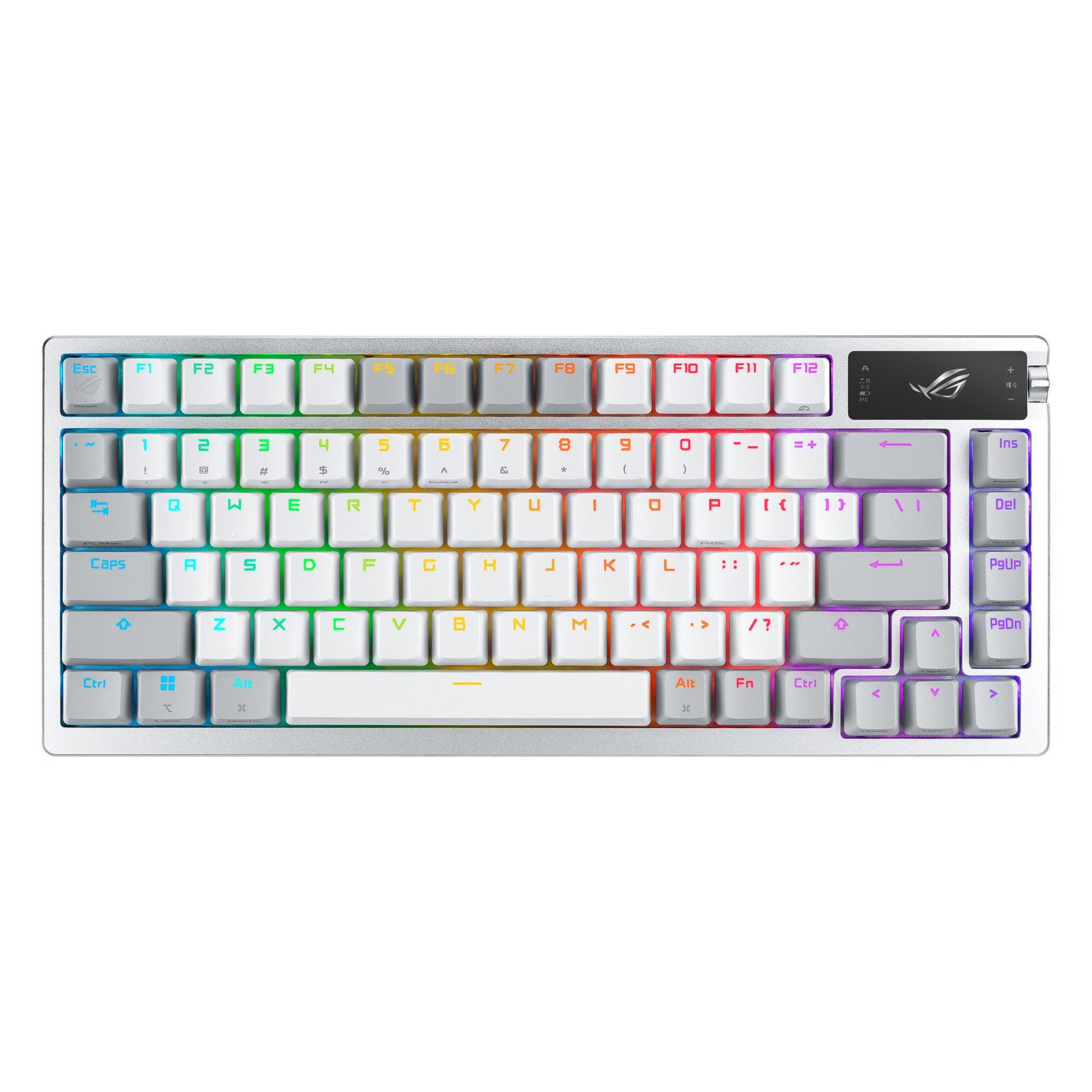
TL;DR
PC Gamer scored it 90/100. TechRadar called it 'one of the best mechanical keyboards you can buy.' Reddit owners are the most surprised — most expected gamer marketing, got a gasket-mounted, pre-lubed, hot-swap 75% with insane battery life. The Armoury Crate software is the universally panned weak link, and $250 is a lot for a keyboard, but the build is the real deal.
Verdict: Depends on Use Case
Pros
- +Pre-lubed switches, gasket mount, sound dampening — Asus actually shipped enthusiast features
- +Hot-swap PCB with included keycap puller, switch puller, switch opener, lube, and brush in box
- +2.4 GHz wireless with no perceptible latency (TechRadar) and 2,000+ hour battery life claim (Asus)
- +OLED screen + control knob is genuinely useful — system monitoring, media controls, profile switching
- +75% layout retains arrow keys + F-row + nav cluster — usable as a daily driver, not just a gaming-only board
Cons
- −Armoury Crate software is universally hated — PC Gamer: 'damned Armoury Crate' as a con bullet
- −$250 launch price is the highest barrier — TechRadar: 'one of the most expensive keyboards you can buy right now'
- −Per-key RGB doesn't shine through the keycap legends well — owners turn it off
- −OLED display + RGB combined is fun but kills battery vs. the marketing-claim 2,000 hours
- −Armoury Crate periodically loses profile state when switching USB ↔ wireless (PC Gamer)
Ethan Park
Published May 3, 2026
The Asus ROG Azoth is the keyboard that proved a mainstream gaming brand could ship a real enthusiast board if it wanted to. Pre-lubed switches, gasket mount, sound dampening, hot-swap PCB, included lube kit, screw-in stabilizers — all of it shipping in 2023 from a company that until then had been making perfectly fine but wholly unremarkable RGB gaming keyboards.
Three years later, owner reviews on Reddit are still mostly positive, the original PC Gamer review (90/100) still holds up, and the Azoth has spawned an entire sub-line (Extreme, X, 96 HE). The price hasn't dropped much, the software is still bad, and Asus still hasn't fixed the OLED-eats-battery problem. None of that is stopping people from buying one.
What you're actually getting
Real enthusiast construction in a Republic of Gamers box. PC Gamer's verdict line is the cleanest summary I found: "The ROG Azoth is easily Asus' best ever gaming keyboard, and one of the best enthusiast boards I've used." The reviewer was specifically surprised that Asus shipped pre-lubed switches, a gasket mount, and sound dampening foam — features then standard on enthusiast boards but rare on big-brand gaming keyboards. The included accessories are the giveaway: switch opener, switch puller, keycap puller, lube jar, and brush all in the box. TechRadar: "It's really nice to see a compact keyboard that positively encourages its users to take it apart and tinker."
75% layout that actually works. TechRadar singled out the layout choice: "you still get the full range of F keys at the top, as well as the Insert, Delete, Page Up and Page Down keys, which are moved so they run down the right-hand side. ... Most importantly of all (for me at least), the four arrow keys are maintained." PC Gamer agrees: "there's more separation and no frustratingly small shift key." If you've bounced off 60% boards because of the missing arrow cluster, the Azoth is the obvious upgrade.
Wireless that works. Three connections (2.4 GHz, Bluetooth, USB-C wired), three-way slider on the back. TechRadar: "Unlike many other wireless keyboards I've used, there was no noticeable lag between me pressing a key and the action being replicated in the game, and there were no times that the connection dropped." Battery life claims top out at "2,000 hours" with everything off (per Asus and Terafied's "ROG Azoth Review - 2,000 Hours Of Battery Life?!" review video, March 2023, 17,832 views). With OLED + RGB on, the spec drops to 130 hours.
The OLED + control knob is the gimmick that earned its keep. Two-inch monochrome OLED in the top-right corner, three-way switch + button knob to its left. TechRadar's setup is the right one: "In Armory Crate, I configured it to measure the CPU frequency and GPU temperature of my PC, so I could keep an eye on things while I played." PC Gamer keeps theirs as media controls and track info. Either way, this is one of the few keyboard "screens" that's actually useful instead of decorative.
How it actually performs in owners' hands
Reddit owner threads are mostly the build-photo genre, but the substantive ones are revealing. The "My first venture to custom keyboard - Asus ROG Azoth" thread (13 upvotes, 23 comments) has one of the better long-term battery anecdotes I've seen — a 7-month owner reporting 4 months between charges: "Got the azoth in October, so got it for over 7 months. Rn, it's the 2nd charge it's on, holding for 4 months and still 35% wireless mode. ... No OLED, RGB brightness 25% with 1 minute timeout. ... Basically, this Battery life is insane out of this world." The trick is turning the OLED off and dimming the RGB.
The modding pattern is the second tell. The "ROG Azoth + Outemu Pear (Tactile) + /dev/tty MT3 keycaps + PE Foam" thread (38 upvotes) shows a typical Azoth modding pass: bought it for $140 with ROG NX Storm switches, swapped to lighter Outemu Pear tactiles ("the Storm switches sound good to me, but they were a bit heavy for extended typing"), replaced stock keycaps with /dev/tty MT3 for "a more thocky sound," replaced the thick stock foam with thin PE foam, and added two layers of PCB tape. This is what enthusiast owners do — the Azoth's hot-swap socket and standard MX switch compatibility make all of it easy.
The "ROG Azoth with a few mods!" build (20 upvotes) is similar: Gateron Milky Yellow Pros, TX V4 stabilizers, PBTfans WoB Icon caps, spacebar foam mod. OP's verdict: "Its much better than stock imo!" The platform takes mods well.
For longer-term context, MynusTenGaming's "A Very, Very, Long-term Review - Asus ROG Azoth - 2+ YEARS" (May 2025) and TwoByteThomas's "ROG Azoth Review: Still Worth It?" (December 2024) are both worth watching if you're considering a 2026 purchase of a 2023 board. (I haven't pulled video transcripts — YouTube blocks transcript scraping from this IP — but the metadata is verified and the channels are mainstream.)
Where it falls short
Armoury Crate is the real con. Both PC Gamer and TechRadar flag it, but PC Gamer puts it sharpest: "the ROG Azoth relies on Asus' horrible Armoury Crate software, and it just takes…so…damned…long...to do anything. ... And sometimes it just doesn't work at all—particularly when you switch from USB to Wi-Fi and vice versa—and the app will get stuck on a permanent loading animation, tanking all the tweaked profile settings you've saved into it." Compare to Wooting's browser-based Wootility or even Razer Synapse and the gap is embarrassing. The keyboard works fine without it day-to-day — the OLED + knob handles most config — but you need Armoury Crate for RGB tuning and profile uploads, and that's where the friction lives.
The price. $249.99 / £269.99 at launch, and it hasn't really come down. PC Gamer: "the real sticking point is that price. I'd never spend $250 on a gaming keyboard, so I don't really know how I can recommend that you do." TechRadar: "one of the most expensive keyboards you can buy right now." The Reddit owner in the modding thread above bought theirs for $140 — that's where the value calculation gets interesting. At list, it's hard to recommend over a Keychron Q1 Max + a $30 lube kit; on sale, it's a different conversation.
RGB shine-through is poor. TechRadar flagged this and Reddit owners echo it. The PBT doubleshot legends don't transmit much light — TechRadar: "when the lighting is off, the letters and symbols on the keycaps can be difficult to see, especially in low-light conditions." Reddit's "My first venture to custom keyboard" OP: "I never used the RGB after taking this picture since it doesn't shine through at all." If you bought this for an RGB rig, you'll be disappointed; if you don't care about RGB, you're paying for a feature you'll disable.
Layout has one specific quirk. PC Gamer: "I hate the positioning of the Delete key personally, but that's my only gripe with the layout itself." The right-hand nav column is a love-it-or-leave-it design choice — most owners adapt within a week.
Should you buy it?
Buy if you want a truly enthusiast-feeling 75% wireless keyboard from a brand that actually has retail support and a warranty. The Azoth is one of the few "gaming keyboards" you can recommend without an asterisk to someone coming from a custom build community — it sounds and feels like a real gasket-mount board, not a mainstream-with-marketing one. PC Gamer scored it 90/100 for a reason.
Buy if you'll use the OLED + knob. The combo is unique to the Azoth line and is the actual differentiator vs. competing wireless 75% boards (Keychron Q1 Max, GMMK Pro, Lemokey L3). If you don't care about either, save ~$80 and get a Q1 Max instead.
Skip if you can't tolerate Armoury Crate. There is no clean software story here, and Asus shows no sign of fixing it. The Wooting 80HE's web-based Wootility is the gold standard; the Azoth is the cautionary counterexample.
Skip if the $250 list price is the limiting factor. Watch for $140-180 sale prices (Reddit reports both); at MSRP this competes with the Keychron Q1 Max ($200, similar feel, no OLED) and the GMMK Pro 2 ($170-200 base).
Wait if you specifically want Hall-effect switches. The Azoth 96 HE shipped in early 2026 and adds magnetic switches + 96% layout. PC Gamer's review was lukewarm on the price but generally positive on the platform; if you want HE, the Wooting 80HE is still the better value, but the Azoth 96 HE is the closest "complete package" alternative if Armoury Crate doesn't scare you off.
Sources consulted
YouTube (4 videos, metadata verified — transcripts blocked from this IP)
- TwoByteThomas — "ROG Azoth Review: Still Worth It?" — 33,915 views, Dec 3 2024
- nearLucid — "An Entry Custom Gaming Keyboard? - ASUS ROG Azoth Review + Modding" — 36,448 views, Oct 21 2023
- Terafied — "ROG Azoth Review - 2,000 Hours Of Battery Life?!" — 17,832 views, Mar 11 2023
- MynusTenGaming — "A Very, Very, Long-term Review - Asus ROG Azoth - 2+ YEARS" — 9,148 views, May 17 2025
Reddit (3 threads cited)
- r/MechanicalKeyboards — "ROG Azoth + Outemu Pear (Tactile) + /dev/tty MT3 keycaps + PE Foam" — 38 upvotes
- r/MechanicalKeyboards — "ROG Azoth with a few mods!" — 20 upvotes
- r/MechanicalKeyboards — "My first venture to custom keyboard - Asus ROG Azoth" — 13 upvotes
Tech media (3 reviews fully parsed)
- PC Gamer — "Asus ROG Azoth gaming keyboard review" by Dave James, score 90/100
- TechRadar — "Asus ROG Azoth review: small yet mighty keyboard proves size doesn't matter"
- RTINGS — "ASUS ROG Azoth Review" (cited for product framing — full body not parsable from this IP)
Products covered in this review
Frequently Asked Questions
Is the OLED display + control knob actually useful or just a gimmick?
Both, depending on how you set it up. TechRadar set it to 'measure the CPU frequency and GPU temperature of my PC, so I could keep an eye on things while I played' and called the system monitoring 'the most useful use of the OLED display.' The control knob has 5 default modes (volume, media, brightness, etc.) and a customizable 6th — PC Gamer notes you can wire it to launch apps, websites, multimedia, or text input. The gimmick is uploading custom GIFs to the screen; the actual utility is profile switching and stats.
Why does everyone hate Armoury Crate?
It's slow, it loses state, and it makes peripheral configuration harder than it should be. PC Gamer: 'It just takes…so…damned…long...to do anything. Just switching between tabs in the app, or trying to check for firmware updates, oh it's interminable. And sometimes it just doesn't work at all.' The keyboard works fine without Armoury Crate — most settings are accessible through the OLED + knob — but you need it for RGB customization and profile uploads. Wooting and Razer both ship better software.
Is the battery life claim of 2,000 hours real?
Only if you turn off everything that makes the keyboard interesting. The 2,000-hour figure (per Asus and the Terafied YouTube review) requires RGB and OLED off. With both on, expect closer to 130 hours per the manufacturer spec. One Reddit owner in the 'My first venture to custom keyboard' thread reported 4 months of typing/gaming on one charge with OLED off and RGB at 25% brightness with a 1-minute timeout — so the platform's idle drain is genuinely low if you tune it down.
ROG Azoth vs Azoth Extreme vs Azoth X vs Azoth 96 HE — which one?
Original Azoth ($250, 2023) is the best price/performance — gasket-mount 75% with mechanical switches. Azoth Extreme ($500, 2024) adds full CNC aluminum and a touchscreen, but PC Gamer questioned the value at $500. Azoth X ($300, 2025) is a space-themed special edition with refined acoustics. Azoth 96 HE ($300+, 2026) swaps to Hall-effect switches and a 96% layout — PC Gamer called it 'a fantastic gaming keyboard marred by a horribly high price tag.' For most buyers the original Azoth at sale price is the right pick.